
Member and Visitor accounts are used to manage the people enrolled at your gym. Each account brings together everything you need for an individual—memberships, attendance history, billing, documents, and important notes—so you always have a complete record in one place.
How are Member Accounts Created?
Member accounts are automatically created whenever someone is enrolled in a membership at your gym. This applies to both non-trial memberships for members and trial memberships for visitors. Accounts can also be created when profiles are added manually by staff or imported into your system.

How Are Member Accounts Used?
Member accounts are the central hub for managing each person’s relationship with your gym. From the manager or staff account (with permissions enabled), you’ll use these accounts to:
-
Track active and past memberships, including trials
-
Monitor attendance and training history
-
Manage billing, payments, and invoices
-
Store signed waivers, agreements, and other documents
-
Record notes about the member’s preferences, goals, or concerns
Because everything is tied to a single member profile, you can quickly see a complete picture of each person’s activity, status, and history with your gym.
Member List View
Anyone enrolled in a membership type at your gym appears under the Members tab (from the main menu), where they are stored in the Member List.
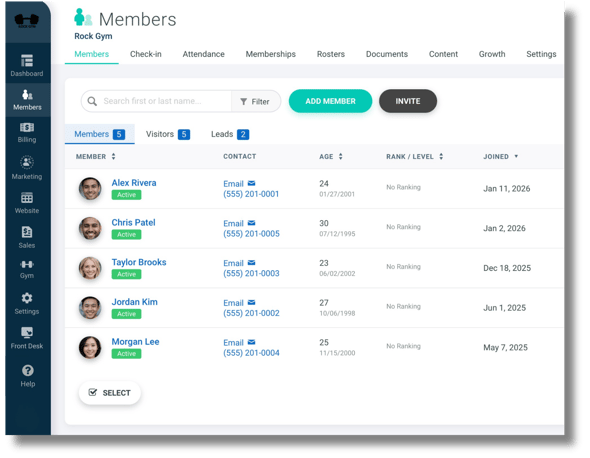
Note: The Leads Tab as shown in the Member List is a shortcut to the Marketing page, where leads are managed separately from both members and visitors.
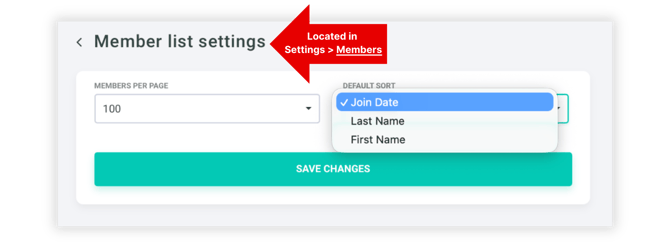
You can customize how the member list is sorted by going to Settings → Members and then selecting Member List Settings. You can adjust each of the following:
-
Members Per Page: 10, 25, 50, or 100 (max)
- Default Sort: Join Date, Last Name, or First Name
Member vs. Visitor Accounts
In Gymdesk, both Members and Visitors are considered member types, and their profiles are almost identical. The key difference between them is not the profile layout, but the type of membership they are enrolled in.
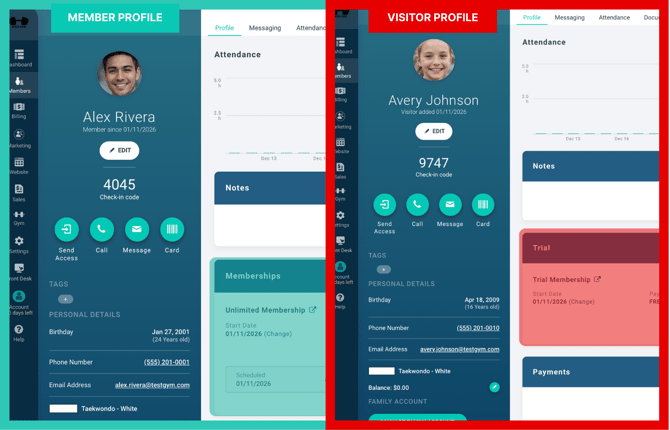
Members are enrolled in Non-Trial Memberships, and count toward the active member limit set by your Gymdesk subscription plan
Visitors are enrolled in Trial Memberships Only, and do NOT count towards the active member limit set by your Gymdesk subscription.