---
title: メンバーシップの設定
description: メンバーシップオプション
---
[コンテンツまでスキップ](https://docs.gymdesk.com/ja-jp/help/membership-options#main-content)
- [日本語 - 日本](https://docs.gymdesk.com/ja-jp/help/membership-options)
- [English](https://docs.gymdesk.com/en/help/docs/membership-options)
日本語 - 日本
翻訳のサブメニューを表示
[](https://gymdesk.com/)
- GYM TYPES
GYM TYPESのサブメニューを表示
- [Fitness gyms software](https://gymdesk.com/software/gyms)
- [Martial arts schools software](https://gymdesk.com/software/martial-arts)
- [Gymnastics software](https://gymdesk.com/software/gymnastics)
- [Yoga studios software](https://gymdesk.com/software/yoga)
- [Dance studios software](https://gymdesk.com/software/dance)
- [Pilates studio software](https://gymdesk.com/software/pilates)
- [Club management software](https://gymdesk.com/software/membership-clubs)
- [Crossfit gym software](https://gymdesk.com/software/crossfit)
- FEATURES
FEATURESのサブメニューを表示
- [Memberships](https://gymdesk.com/features/members)
- [Billing](https://gymdesk.com/features/billing)
- [Attendance](https://gymdesk.com/features/attendance)
- [Booking](https://gymdesk.com/features/booking)
- [Website](https://gymdesk.com/features/website)
- [Point-of-Sale](https://gymdesk.com/features/pos)
- [Marketing](https://gymdesk.com/features/marketing)
- [Reporting](https://gymdesk.com/features/reporting)
- [Facility Access](https://gymdesk.com/features/access)
- [Mobile App](https://gymdesk.com/features/member-app)
- [Integrations](https://gymdesk.com/features/integrations)
- RESOURCES
RESOURCESのサブメニューを表示
- [Articles on growing a fitness business](https://gymdesk.com/blog/)
- [Gyms](https://gymdesk.com/blog/category/gyms/)
- [Martial Arts](https://gymdesk.com/blog/category/martial-arts/)
- [Yoga](https://gymdesk.com/blog/category/yoga/)
- [Gymnastics](https://gymdesk.com/blog/category/gymnastics/)
- [Dance](https://gymdesk.com/blog/category/dance/)
- [Pilates](https://gymdesk.com/blog/category/pilates/)
- [Sports clubs](https://gymdesk.com/blog/category/sport-clubs/)
- [The gym heroes podcast](https://gymdesk.com/blog/category/podcasts/)
- [CUSTOMERS](https://gymdesk.com/customers)
- [PRICING](https://gymdesk.com/pricing)
- [CONTACT](https://gymdesk.com/contact)
- [LOGIN](https://gymdesk.com/login)
メインナビゲーションを開く
メインナビゲーションを閉じる
- GYM TYPES
GYM TYPESのサブメニューを表示
- [Fitness gyms software](https://gymdesk.com/software/gyms)
- [Martial arts schools software](https://gymdesk.com/software/martial-arts)
- [Gymnastics software](https://gymdesk.com/software/gymnastics)
- [Yoga studios software](https://gymdesk.com/software/yoga)
- [Dance studios software](https://gymdesk.com/software/dance)
- [Pilates studio software](https://gymdesk.com/software/pilates)
- [Club management software](https://gymdesk.com/software/membership-clubs)
- [Crossfit gym software](https://gymdesk.com/software/crossfit)
- FEATURES
FEATURESのサブメニューを表示
- [Memberships](https://gymdesk.com/features/members)
- [Billing](https://gymdesk.com/features/billing)
- [Attendance](https://gymdesk.com/features/attendance)
- [Booking](https://gymdesk.com/features/booking)
- [Website](https://gymdesk.com/features/website)
- [Point-of-Sale](https://gymdesk.com/features/pos)
- [Marketing](https://gymdesk.com/features/marketing)
- [Reporting](https://gymdesk.com/features/reporting)
- [Facility Access](https://gymdesk.com/features/access)
- [Mobile App](https://gymdesk.com/features/member-app)
- [Integrations](https://gymdesk.com/features/integrations)
- RESOURCES
RESOURCESのサブメニューを表示
- [Articles on growing a fitness business](https://gymdesk.com/blog/)
- [Gyms](https://gymdesk.com/blog/category/gyms/)
- [Martial Arts](https://gymdesk.com/blog/category/martial-arts/)
- [Yoga](https://gymdesk.com/blog/category/yoga/)
- [Gymnastics](https://gymdesk.com/blog/category/gymnastics/)
- [Dance](https://gymdesk.com/blog/category/dance/)
- [Pilates](https://gymdesk.com/blog/category/pilates/)
- [Sports clubs](https://gymdesk.com/blog/category/sport-clubs/)
- [The gym heroes podcast](https://gymdesk.com/blog/category/podcasts/)
- [CUSTOMERS](https://gymdesk.com/customers)
- [PRICING](https://gymdesk.com/pricing)
- [CONTACT](https://gymdesk.com/contact)
- [LOGIN](https://gymdesk.com/login)
- - [日本語 - 日本](https://docs.gymdesk.com/ja-jp/help/membership-options)
- [English](https://docs.gymdesk.com/en/help/docs/membership-options)
日本語 - 日本
翻訳のサブメニューを表示
- [Sign-Up](https://gymdesk.com/register)
[Sign-Up](https://gymdesk.com/register)
何かお困りですか?
- 検索フィールドが空なので、候補はありません。
1. [Gymdesk Help](https://docs.gymdesk.com/ja-jp/help?hsLang=ja-jp)
2. [Members](https://docs.gymdesk.com/ja-jp/help/members?hsLang=ja-jp)
3. [Membership Structure & Setup](https://docs.gymdesk.com/ja-jp/help/members?hsLang=ja-jp#membership-structure-setup)
# メンバーシップの設定
メンバーの請求とトレーニングへのアクセスは、メンバーシップオプションを通じて管理されます。動画ではメンバーシップ内容をどのようにカスタマイズするかを確認できますが、以下に読み進める形でも理解できます。
新しいメンバーシップオプションを作成するには、**「Members」→「Memberships」**に進み、**「Add Membership Option」**ボタンをクリックします。
**単体メンバーシップ / ファミリーメンバーシップ**
メンバー1人に割り当てるメンバーシップ、または家族アカウント全体に割り当てるメンバーシップを作成できます。ファミリー共有メンバーシップは、家族全員のアクセス設定をまとめて行うことができ、家族アカウントとして支払いを一括化できます。単体メンバー向けメンバーシップは、家族の各メンバーごとにアクセス権限を細かく管理したい場合に適しています。
### **料金設定**
メンバーシップの料金設定では、メンバーからの支払い方法と支払いタイミングを決定します。これにより、提供しているプログラムの内容に合わせて柔軟に支払いモデルを設定できます。請求開始日を調整したり、登録料を追加したり、未払いに対して延滞料金を設定したりすることも可能です。
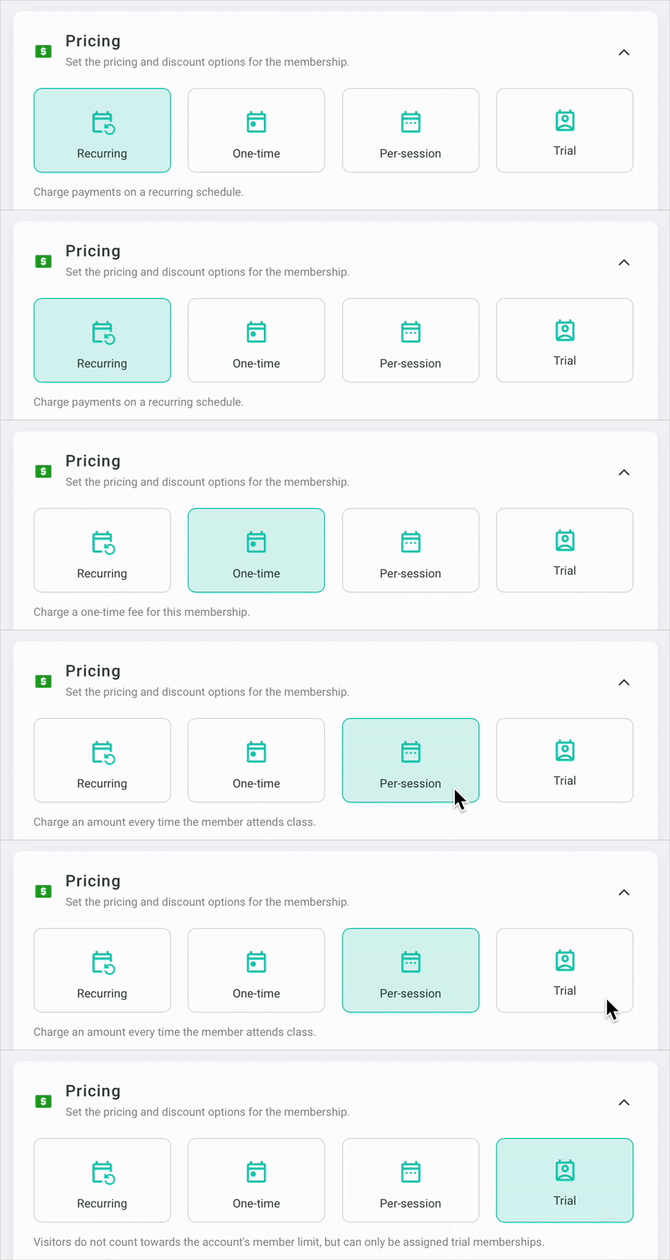
メンバーシップ作成時には、以下の4つの料金タイプから選択できます:
- **Recurring(定期課金)**:任意の日数、週数、月数、または年数ごとに定期的に支払いが発生
- **One time(都度課金)**:メンバーシップ開始時に一度だけ、そして更新する度に支払いが発生
- **Per-session(セッションごと課金)**:メンバーがチェックインするたびに支払いが発生
- **Trial(トライアル)**:無料または有料の体験メンバーシップ
※トライアルのみ訪問者に割り当て可能(訪問者はアカウントのメンバー数にカウントされません)
### **初回支払いの設定**
メンバーシップの請求を開始するタイミングは2種類(すべての料金タイプで利用可能):
- **Immediate billing(即時請求)※デフォルト**:登録と同時に請求が開始
- **Start billing on first check-in(初回チェックインで請求開始)**:メンバーが最初のクラスに参加するまで請求を保留
**ファミリー料金・割引**
ファミリーアカウントに特別料金を適用する方法は2つ:
1. **ファミリー共有メンバーシップの場合**:アクティブな家族人数によって異なる料金を設定可能
2. **単体メンバー向けメンバーシップの場合**:アクティブな家族人数に応じた割引を設定可能
- 例:家族に2名のアクティブメンバーがいる場合、3人目がメンバーシップに加入すると「3人目割引」が自動適用される
### **書類**
メンバーシップごとに署名が必要な書類がある場合は、ここで紐付けられます。書類自体は[「Documents」セクション](https://docs.gymdesk.com/help/document-management?hsLang=ja-jp)で事前に作成しておく必要があります。
### **期間設定**
メンバーシップは継続型か、または期間限定のどちらかにできます:
- 開始日からの日数・週数・月数・年数で設定
- または、特定の期間(例:シーズン制、大学クラブなどの学期制)を設定
期間制メンバーシップの場合、期限到達時の動作を選択できます:
- **支払い期間に合わせて自動更新**(定期課金と併用)
例:月額なら毎月更新(いわゆる月会費制)
- **メンバーシップの元の期間で自動更新**
- **自動更新なしで期限切れにする**
### **トレーニングのアクセス設定**
メンバーシップでアクセスできるプログラムやセッション、利用回数を設定できます。
アクセスレベルは3種類あります:
1. **Unlimited(無制限)**:指定プログラムのセッションに無制限で参加可能
2. **Sessions(回数制)**:1日/週/月 または購入単位で回数を設定
- 購入単位の場合、回数を使い切るとメンバーシップ終了
3. **Days(日数制)**:週/月/年 または購入単位で参加できる日数を設定
- 購入単位の場合、日数を使い切るとメンバーシップ終了
プログラムを選択した後、「All Sessions」から各プログラム内の特定セッションだけに制限することも可能です。
### **登録上限**
特定のメンバーシップに登録できる人数を制限できます。クラスに人数制限がある場合に便利です。
上限があるメンバーシップは、空き枠がサインアップ時に表示され、満員になると表示されなくなります。※管理者はメンバープロフィールから満員のメンバーシップにも手動で追加可能
### **メンバーへの表示設定**
メンバー設定で「メンバーがサインアップ時にメンバーシップを選択できる」機能をオンにしている場合、どのメンバーシップをメンバーのポータルに表示するか選択できます。割引用、特別メンバー用、限定メンバー用など、管理者が手動で割り当てるメンバーシップを非表示にしておく場合に便利です。
- [Getting started](https://docs.gymdesk.com/ja-jp/help/getting-started?hsLang=ja-jp#main-content)
- [Data & Payments Migration](https://docs.gymdesk.com/ja-jp/help/getting-started?hsLang=ja-jp#data-payments-migration)
- [Account](https://docs.gymdesk.com/ja-jp/help/account?hsLang=ja-jp)
- [Gym](https://docs.gymdesk.com/ja-jp/help/gym?hsLang=ja-jp#main-content)
- [Schedule & Booking Management](https://docs.gymdesk.com/ja-jp/help/gym?hsLang=ja-jp#schedule-booking-management)
- [Staff Management](https://docs.gymdesk.com/ja-jp/help/gym?hsLang=ja-jp#staff-management)
- [Ranks & Promotions](https://docs.gymdesk.com/ja-jp/help/gym?hsLang=ja-jp#ranks-promotions)
- [Members](https://docs.gymdesk.com/ja-jp/help/members?hsLang=ja-jp#main-content)
- [Membership Structure & Setup](https://docs.gymdesk.com/ja-jp/help/members?hsLang=ja-jp#membership-structure-setup)
- [Member Payments](https://docs.gymdesk.com/ja-jp/help/members?hsLang=ja-jp#member-payments)
- [Member Portals & Apps](https://docs.gymdesk.com/ja-jp/help/members?hsLang=ja-jp#member-portals-apps)
- [Attendance Tracking & Check-Ins](https://docs.gymdesk.com/ja-jp/help/members?hsLang=ja-jp#attendance-tracking-check-ins)
- [Billing](https://docs.gymdesk.com/ja-jp/help/billing?hsLang=ja-jp#main-content)
- [Payment Processing](https://docs.gymdesk.com/ja-jp/help/billing?hsLang=ja-jp#payment-processing)
- [Billing Settings & Discounts](https://docs.gymdesk.com/ja-jp/help/billing?hsLang=ja-jp#billing-settings-discounts)
- [Marketing](https://docs.gymdesk.com/ja-jp/help/marketing?hsLang=ja-jp#main-content)
- [Email & Text Messaging](https://docs.gymdesk.com/ja-jp/help/marketing?hsLang=ja-jp#email-text-messaging)
- [Lead Management & Automations](https://docs.gymdesk.com/ja-jp/help/marketing?hsLang=ja-jp#lead-management-automations)
- [Gym Websites](https://docs.gymdesk.com/ja-jp/help/gym-websites?hsLang=ja-jp)
- [Point of Sales](https://docs.gymdesk.com/ja-jp/help/point-of-sales?hsLang=ja-jp)
- [Integrations](https://docs.gymdesk.com/ja-jp/help/integrations?hsLang=ja-jp)
- [Gymdesk Documentation & Policies](https://docs.gymdesk.com/ja-jp/help/gymdesk-documentation-policies?hsLang=ja-jp)
- [Company](https://gymdesk.com/)
- [About us](https://gymdesk.com/content/about)
- [Contact us](https://gymdesk.com/contact)
- [Resources](https://gymdesk.com/blog/)
- [Features](https://gymdesk.com/)
- [Memberships](https://gymdesk.com/features/members)
- [Billing](https://gymdesk.com/features/billing)
- [Attendance](https://gymdesk.com/features/attendance)
- [Booking](https://gymdesk.com/features/booking)
- [Marketing](https://gymdesk.com/features/marketing)
- [Website](https://gymdesk.com/features/website)
- [Point-of-sale](https://gymdesk.com/features/pos)
- [Reporting](https://gymdesk.com/features/reporting)
- [Facility access](https://gymdesk.com/features/access)
- [Mobile app](https://gymdesk.com/features/member-app)
- [Integrations](https://gymdesk.com/features/integrations)
- [Gym types](https://gymdesk.com/)
- [Martial arts](https://gymdesk.com/software/martial-arts)
- [Membership clubs](https://gymdesk.com/software/membership-clubs)
- [Yoga studios](https://gymdesk.com/software/yoga)
- [Pilates studios](https://gymdesk.com/software/pilates)
- [Fitness gyms](https://gymdesk.com/software/gyms)
- [Gymnastics gyms](https://gymdesk.com/software/gymnastics)
- [Dance studios](https://gymdesk.com/software/dance)
- [Crossfit gyms](https://gymdesk.com/software/crossfit)
- [Resources](https://gymdesk.com/)
- [Our Customers](https://gymdesk.com/customers)
- [Documentation](https://docs.gymdesk.com/help/docs)
- [Pricing](https://gymdesk.com/pricing)
- [Membership contract template](https://gymdesk.com/lp/contract-template)
- [Black belt widget](https://gymdesk.com/lp/bbwidget)
- [Gym software guide](https://gymdesk.com/best-gym-management-software)
- [Trust center](https://gymdesk.com/page/trust)
- [Terms of service](https://gymdesk.com/page/terms)
- [Privacy policy](https://gymdesk.com/page/privacy)
- [Comparison](https://gymdesk.com/)
- [Mindbody](https://gymdesk.com/alternative/mindbody)
- [Jackrabbit](https://gymdesk.com/alternative/jackrabbit)
- [Zenplanner](https://gymdesk.com/alternative/zenplanner)
- [Kicksite](https://gymdesk.com/alternative/kicksite)
- [Spark membership](https://gymdesk.com/alternative/spark)
- [Pushpress](https://gymdesk.com/alternative/pushpress)
- [Gymmaster](https://gymdesk.com/alternative/gymmaster)
- [Glofox](https://gymdesk.com/alternative/glofox)
- [Hapana](https://gymdesk.com/alternative/hapana)
- [Mariana Tek](https://gymdesk.com/alternative/marianatek)
- [Momence](https://gymdesk.com/alternative/momence)
[](https://gymdesk.com/)
Built and run in Austin, TX
Copyright © 2025