---
title: 会員証(メンバーシップカード)
description: 会員証
---
[コンテンツまでスキップ](https://docs.gymdesk.com/ja-jp/help/membership-cards#main-content)
- [日本語 - 日本](https://docs.gymdesk.com/ja-jp/help/membership-cards)
- [English](https://docs.gymdesk.com/en/help/docs/membership-cards)
日本語 - 日本
翻訳のサブメニューを表示
[](https://gymdesk.com/)
- GYM TYPES
GYM TYPESのサブメニューを表示
- [Fitness gyms software](https://gymdesk.com/software/gyms)
- [Martial arts schools software](https://gymdesk.com/software/martial-arts)
- [Gymnastics software](https://gymdesk.com/software/gymnastics)
- [Yoga studios software](https://gymdesk.com/software/yoga)
- [Dance studios software](https://gymdesk.com/software/dance)
- [Pilates studio software](https://gymdesk.com/software/pilates)
- [Club management software](https://gymdesk.com/software/membership-clubs)
- [Crossfit gym software](https://gymdesk.com/software/crossfit)
- FEATURES
FEATURESのサブメニューを表示
- [Memberships](https://gymdesk.com/features/members)
- [Billing](https://gymdesk.com/features/billing)
- [Attendance](https://gymdesk.com/features/attendance)
- [Booking](https://gymdesk.com/features/booking)
- [Website](https://gymdesk.com/features/website)
- [Point-of-Sale](https://gymdesk.com/features/pos)
- [Marketing](https://gymdesk.com/features/marketing)
- [Reporting](https://gymdesk.com/features/reporting)
- [Facility Access](https://gymdesk.com/features/access)
- [Mobile App](https://gymdesk.com/features/member-app)
- [Integrations](https://gymdesk.com/features/integrations)
- RESOURCES
RESOURCESのサブメニューを表示
- [Articles on growing a fitness business](https://gymdesk.com/blog/)
- [Gyms](https://gymdesk.com/blog/category/gyms/)
- [Martial Arts](https://gymdesk.com/blog/category/martial-arts/)
- [Yoga](https://gymdesk.com/blog/category/yoga/)
- [Gymnastics](https://gymdesk.com/blog/category/gymnastics/)
- [Dance](https://gymdesk.com/blog/category/dance/)
- [Pilates](https://gymdesk.com/blog/category/pilates/)
- [Sports clubs](https://gymdesk.com/blog/category/sport-clubs/)
- [The gym heroes podcast](https://gymdesk.com/blog/category/podcasts/)
- [CUSTOMERS](https://gymdesk.com/customers)
- [PRICING](https://gymdesk.com/pricing)
- [CONTACT](https://gymdesk.com/contact)
- [LOGIN](https://gymdesk.com/login)
メインナビゲーションを開く
メインナビゲーションを閉じる
- GYM TYPES
GYM TYPESのサブメニューを表示
- [Fitness gyms software](https://gymdesk.com/software/gyms)
- [Martial arts schools software](https://gymdesk.com/software/martial-arts)
- [Gymnastics software](https://gymdesk.com/software/gymnastics)
- [Yoga studios software](https://gymdesk.com/software/yoga)
- [Dance studios software](https://gymdesk.com/software/dance)
- [Pilates studio software](https://gymdesk.com/software/pilates)
- [Club management software](https://gymdesk.com/software/membership-clubs)
- [Crossfit gym software](https://gymdesk.com/software/crossfit)
- FEATURES
FEATURESのサブメニューを表示
- [Memberships](https://gymdesk.com/features/members)
- [Billing](https://gymdesk.com/features/billing)
- [Attendance](https://gymdesk.com/features/attendance)
- [Booking](https://gymdesk.com/features/booking)
- [Website](https://gymdesk.com/features/website)
- [Point-of-Sale](https://gymdesk.com/features/pos)
- [Marketing](https://gymdesk.com/features/marketing)
- [Reporting](https://gymdesk.com/features/reporting)
- [Facility Access](https://gymdesk.com/features/access)
- [Mobile App](https://gymdesk.com/features/member-app)
- [Integrations](https://gymdesk.com/features/integrations)
- RESOURCES
RESOURCESのサブメニューを表示
- [Articles on growing a fitness business](https://gymdesk.com/blog/)
- [Gyms](https://gymdesk.com/blog/category/gyms/)
- [Martial Arts](https://gymdesk.com/blog/category/martial-arts/)
- [Yoga](https://gymdesk.com/blog/category/yoga/)
- [Gymnastics](https://gymdesk.com/blog/category/gymnastics/)
- [Dance](https://gymdesk.com/blog/category/dance/)
- [Pilates](https://gymdesk.com/blog/category/pilates/)
- [Sports clubs](https://gymdesk.com/blog/category/sport-clubs/)
- [The gym heroes podcast](https://gymdesk.com/blog/category/podcasts/)
- [CUSTOMERS](https://gymdesk.com/customers)
- [PRICING](https://gymdesk.com/pricing)
- [CONTACT](https://gymdesk.com/contact)
- [LOGIN](https://gymdesk.com/login)
- - [日本語 - 日本](https://docs.gymdesk.com/ja-jp/help/membership-cards)
- [English](https://docs.gymdesk.com/en/help/docs/membership-cards)
日本語 - 日本
翻訳のサブメニューを表示
- [Sign-Up](https://gymdesk.com/register)
[Sign-Up](https://gymdesk.com/register)
何かお困りですか?
- 検索フィールドが空なので、候補はありません。
1. [Gymdesk Help](https://docs.gymdesk.com/ja-jp/help?hsLang=ja-jp)
2. [Members](https://docs.gymdesk.com/ja-jp/help/members?hsLang=ja-jp)
3. [Attendance Tracking & Check-Ins](https://docs.gymdesk.com/ja-jp/help/members?hsLang=ja-jp#attendance-tracking-check-ins)
# 会員証(メンバーシップカード)
メンバーには、セッションのチェックインに使用できる物理カードまたはバーチャルカードを提供できます。
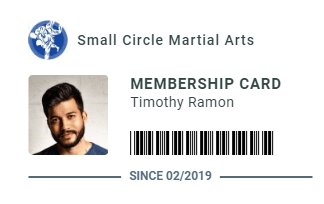
プレミアム用紙または PVC プラスチックに印刷された 個別会員カード を発行できます。これには、(任意で)顔写真入りの本人確認情報 と、出席管理に利用できるバーコードを含められます。
また、メンバーはオンラインアカウントからカードを保存・印刷したり、スマートフォンに表示してチェックインに利用することもできます。
**メンバーシップカードの生成**
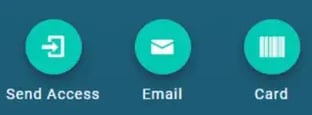
メンバーシップカードは、メンバーのプロフィール画面から作成できます。左サイドバーの**「Card」ボタン**をクリックすると、カードを生成できます。
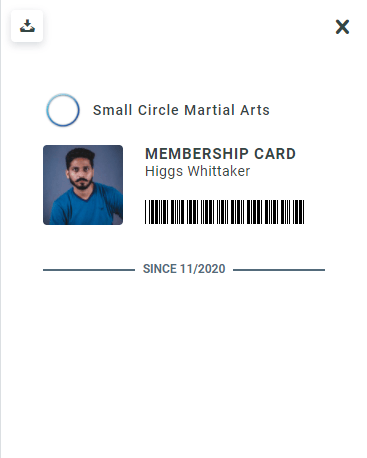
生成されたメンバーシップカードには**バーコード**が含まれており、任意のバーコードスキャナーで読み取ることで、**PINコードを入力せずにチェックイン**することが可能になります。
**メンバーシップカードの印刷**
メンバーシップカードを印刷する方法は、通常の用紙以外に次の 2 つの選択肢があります:
- **光沢紙を使用して対応プリンターで印刷する方法
• PVC プラスチックカードに印刷する方法**
光沢紙の場合はとても簡単で、カードをプリンターで印刷し、その後カードの形にカットするだけで完成します。
一方、PVC カードへの印刷はより高級感があり、耐久性も高くなります。ただし、通常は専用の高価なプリンターが必要です。幸い、より手頃な方法として**メディアディスク印刷トレイ付きのインクジェットプリンター**を使う方法があります。
**PVC カード印刷**
一般的で比較的安価なプリンターを使用した PVC 印刷のために、以下のガイドをご用意しました。なお、プリンター操作に関する技術サポートは提供できないこと、そして通常の印刷よりも手順が多い点にご注意ください。
一部のインクジェットプリンターには、コンパクトディスク(CD)印刷用のメディアトレイが付属しています。現在ではあまり使われなくなりましたが、適切な PVC カード用トレイを使用することで、このメディアトレイを PVC カード印刷に再利用できます。
必要なもの:
・コンパクトディスクカバープリント用のメディアトレイを備えたインクジェットプリンター
・プリンターに対応した PVC カード用トレイ
・PVC カード
[Brainstorm ID](https://brainstormidsupply.com/inkjet-id-cards/kits-cards-trays/printer-trays)は、複数のインクジェットプリンター向けにこのようなトレイを製造している会社です。また、Amazonでも同様の PVC プリンタートレイが購入できます。本ガイドではCanon PIXMA TS8220を例として使用しますが、PVC カードトレイに対応したプリンターであれば手順は概ね同じです。
上記の必要なものが揃ったら、印刷手順に進むことができます。
- プリンターの指示に従ってカードトレイを準備します。Brainstorm ID のトレイを購入した場合、公式サイトに各トレイごとのビデオチュートリアルがあります。本ガイドで使用しているプリンターでは、1 枚だけ印刷する場合でも、PVC カードを 2 枚トレイにセットする必要があります。この段階では、まだプリンターにトレイを挿入しないでください。
- メンバープロフィールからメンバーシップカードのページに移動し、印刷アイコンをクリックします。
- 印刷設定でメディアタイプを「Printable Disc(プリンタブルディスク)」に変更します。多くのブラウザでは、簡易的なブラウザ印刷ダイアログではなく、システムのプリンターダイアログを開く必要があります。Chromeでは次のように実施します。
- システムプリンターダイアログが開いたら、使用するインクジェットプリンターを選択し、「Preferences(プロパティ)」をクリックします。メディアタイプを「Printable Disc」、用紙ソースおよび用紙サイズを「Multi-purpose tray(マルチパーパストレイ)」に設定します(プリンターによって名称が異なる場合があります)。次のようになります。
- 「OK」をクリックして設定を確定し、印刷の準備が整います。印刷ダイアログで「Print(印刷)」をクリックして印刷を開始します。
- Canon PIXMA TS8220 の場合、プリンターからトレイの挿入指示が出るまで待ちます。プリンターの画面上の指示に従い、求められたタイミングでトレイを挿入します。
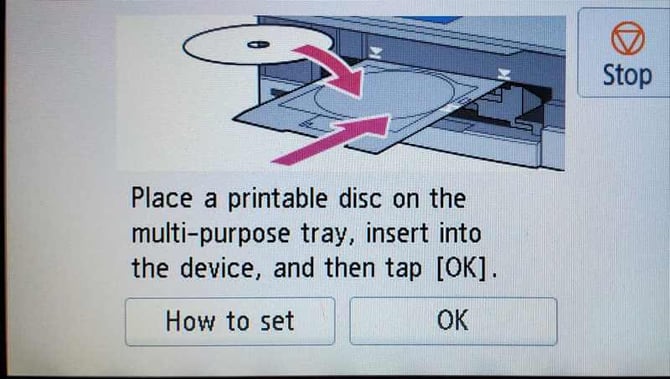
- トレイを挿入して「OK」を押すと印刷が開始されます。プリンターが一度停止し、何も印刷されていないように見えて再度トレイの挿入を求めることがありますが、その際は指示に従って再度トレイを挿入してください。
- 以上です!これでプロフェッショナルな見た目の PVC 会員カードが完成します。工程は少し複雑に見えるかもしれませんが、一度行えば比較的簡単です。印刷位置をカード中央に合わせるため、数回マージン設定を調整する必要があるかもしれません。
**カードのエクスポートと自分で印刷を管理する方法**
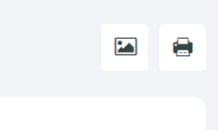
会員カードを画像として保存し、お使いのプリンターに適した任意の印刷ソフトで印刷することもできます。カードを保存するには、会員カードレイアウト上部にある画像アイコンをクリックしてください。
Brainstorm IDのトレイを使用している場合、複数のカードを一度に処理できる[PDF ジェネレーター](https://brainstormidsupply.com/id-card-printing-layout-tool.html)が提供されています。カードを画像として保存し、そのジェネレーターに読み込ませることで、複数枚のカードをまとめて印刷することも可能です。
**メンバーポータルでの会員カード**
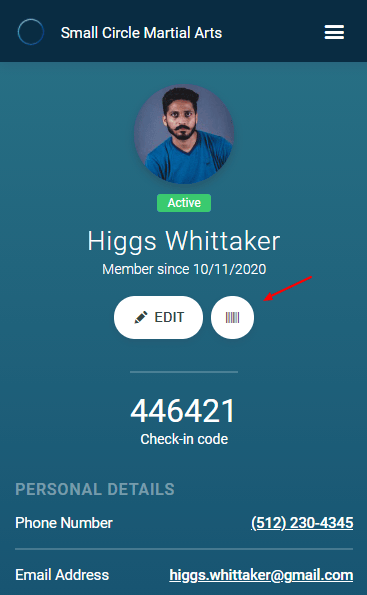
メンバーは、メインのプロフィール画面にあるバーコードアイコンをクリックすることで、自分の会員カードにアクセスできます。これを開くと、モバイル端末のバーコードスキャナー/QRコードカメラで直接使用できる会員カードが表示されます。また、左上にあるダウンロードボタンを使って印刷することもできます。
- [Getting started](https://docs.gymdesk.com/ja-jp/help/getting-started?hsLang=ja-jp#main-content)
- [Data & Payments Migration](https://docs.gymdesk.com/ja-jp/help/getting-started?hsLang=ja-jp#data-payments-migration)
- [Account](https://docs.gymdesk.com/ja-jp/help/account?hsLang=ja-jp)
- [Gym](https://docs.gymdesk.com/ja-jp/help/gym?hsLang=ja-jp#main-content)
- [Schedule & Booking Management](https://docs.gymdesk.com/ja-jp/help/gym?hsLang=ja-jp#schedule-booking-management)
- [Staff Management](https://docs.gymdesk.com/ja-jp/help/gym?hsLang=ja-jp#staff-management)
- [Ranks & Promotions](https://docs.gymdesk.com/ja-jp/help/gym?hsLang=ja-jp#ranks-promotions)
- [Members](https://docs.gymdesk.com/ja-jp/help/members?hsLang=ja-jp#main-content)
- [Membership Structure & Setup](https://docs.gymdesk.com/ja-jp/help/members?hsLang=ja-jp#membership-structure-setup)
- [Member Payments](https://docs.gymdesk.com/ja-jp/help/members?hsLang=ja-jp#member-payments)
- [Member Portals & Apps](https://docs.gymdesk.com/ja-jp/help/members?hsLang=ja-jp#member-portals-apps)
- [Attendance Tracking & Check-Ins](https://docs.gymdesk.com/ja-jp/help/members?hsLang=ja-jp#attendance-tracking-check-ins)
- [Billing](https://docs.gymdesk.com/ja-jp/help/billing?hsLang=ja-jp#main-content)
- [Payment Processing](https://docs.gymdesk.com/ja-jp/help/billing?hsLang=ja-jp#payment-processing)
- [Billing Settings & Discounts](https://docs.gymdesk.com/ja-jp/help/billing?hsLang=ja-jp#billing-settings-discounts)
- [Marketing](https://docs.gymdesk.com/ja-jp/help/marketing?hsLang=ja-jp#main-content)
- [Email & Text Messaging](https://docs.gymdesk.com/ja-jp/help/marketing?hsLang=ja-jp#email-text-messaging)
- [Lead Management & Automations](https://docs.gymdesk.com/ja-jp/help/marketing?hsLang=ja-jp#lead-management-automations)
- [Gym Websites](https://docs.gymdesk.com/ja-jp/help/gym-websites?hsLang=ja-jp)
- [Point of Sales](https://docs.gymdesk.com/ja-jp/help/point-of-sales?hsLang=ja-jp)
- [Integrations](https://docs.gymdesk.com/ja-jp/help/integrations?hsLang=ja-jp)
- [Gymdesk Documentation & Policies](https://docs.gymdesk.com/ja-jp/help/gymdesk-documentation-policies?hsLang=ja-jp)
- [Company](https://gymdesk.com/)
- [About us](https://gymdesk.com/content/about)
- [Contact us](https://gymdesk.com/contact)
- [Resources](https://gymdesk.com/blog/)
- [Features](https://gymdesk.com/)
- [Memberships](https://gymdesk.com/features/members)
- [Billing](https://gymdesk.com/features/billing)
- [Attendance](https://gymdesk.com/features/attendance)
- [Booking](https://gymdesk.com/features/booking)
- [Marketing](https://gymdesk.com/features/marketing)
- [Website](https://gymdesk.com/features/website)
- [Point-of-sale](https://gymdesk.com/features/pos)
- [Reporting](https://gymdesk.com/features/reporting)
- [Facility access](https://gymdesk.com/features/access)
- [Mobile app](https://gymdesk.com/features/member-app)
- [Integrations](https://gymdesk.com/features/integrations)
- [Gym types](https://gymdesk.com/)
- [Martial arts](https://gymdesk.com/software/martial-arts)
- [Membership clubs](https://gymdesk.com/software/membership-clubs)
- [Yoga studios](https://gymdesk.com/software/yoga)
- [Pilates studios](https://gymdesk.com/software/pilates)
- [Fitness gyms](https://gymdesk.com/software/gyms)
- [Gymnastics gyms](https://gymdesk.com/software/gymnastics)
- [Dance studios](https://gymdesk.com/software/dance)
- [Crossfit gyms](https://gymdesk.com/software/crossfit)
- [Resources](https://gymdesk.com/)
- [Our Customers](https://gymdesk.com/customers)
- [Documentation](https://docs.gymdesk.com/help/docs)
- [Pricing](https://gymdesk.com/pricing)
- [Membership contract template](https://gymdesk.com/lp/contract-template)
- [Black belt widget](https://gymdesk.com/lp/bbwidget)
- [Gym software guide](https://gymdesk.com/best-gym-management-software)
- [Trust center](https://gymdesk.com/page/trust)
- [Terms of service](https://gymdesk.com/page/terms)
- [Privacy policy](https://gymdesk.com/page/privacy)
- [Comparison](https://gymdesk.com/)
- [Mindbody](https://gymdesk.com/alternative/mindbody)
- [Jackrabbit](https://gymdesk.com/alternative/jackrabbit)
- [Zenplanner](https://gymdesk.com/alternative/zenplanner)
- [Kicksite](https://gymdesk.com/alternative/kicksite)
- [Spark membership](https://gymdesk.com/alternative/spark)
- [Pushpress](https://gymdesk.com/alternative/pushpress)
- [Gymmaster](https://gymdesk.com/alternative/gymmaster)
- [Glofox](https://gymdesk.com/alternative/glofox)
- [Hapana](https://gymdesk.com/alternative/hapana)
- [Mariana Tek](https://gymdesk.com/alternative/marianatek)
- [Momence](https://gymdesk.com/alternative/momence)
[](https://gymdesk.com/)
Built and run in Austin, TX
Copyright © 2025
```json
{
"@context" : "https://schema.org",
"@type" : "VideoObject",
"contentUrl" : "https://stream.mux.com/9QAn9AQq01yI1zjSWCe015vHD2Kopi36zPqdjHMOIKr28/capped-1080p.mp4",
"dateModified" : "2025-03-03T01:14:41.788Z",
"duration" : "PT6S",
"height" : 844,
"name" : "print-settings-1",
"thumbnailUrl" : "https://145178229.fs1.hubspotusercontent-eu1.net/hubfs/145178229/print-settings-1.webm/medium.jpg",
"uploadDate" : "2025-03-03T01:14:41.783Z",
"width" : 478
}
```
```json
{
"@context" : "https://schema.org",
"@type" : "VideoObject",
"contentUrl" : "https://stream.mux.com/gb6iPe5SvYZ71roQOiFpq8jfj01xjoDTPD00B01FaM6Rco/capped-1080p.mp4",
"dateModified" : "2025-03-03T01:16:02.639Z",
"duration" : "PT20S",
"height" : 726,
"name" : "print-settings-2-1",
"thumbnailUrl" : "https://145178229.fs1.hubspotusercontent-eu1.net/hubfs/145178229/print-settings-2-1.webm/medium.jpg",
"uploadDate" : "2025-03-03T01:16:02.634Z",
"width" : 836
}
```