---
title: はじめに
description: はじめに
---
[コンテンツまでスキップ](https://docs.gymdesk.com/ja-jp/help/gym-setup#main-content)
- [日本語 - 日本](https://docs.gymdesk.com/ja-jp/help/gym-setup)
- [English](https://docs.gymdesk.com/en/help/docs/gym-setup)
日本語 - 日本
翻訳のサブメニューを表示
[](https://gymdesk.com/)
- GYM TYPES
GYM TYPESのサブメニューを表示
- [Fitness gyms software](https://gymdesk.com/software/gyms)
- [Martial arts schools software](https://gymdesk.com/software/martial-arts)
- [Gymnastics software](https://gymdesk.com/software/gymnastics)
- [Yoga studios software](https://gymdesk.com/software/yoga)
- [Dance studios software](https://gymdesk.com/software/dance)
- [Pilates studio software](https://gymdesk.com/software/pilates)
- [Club management software](https://gymdesk.com/software/membership-clubs)
- [Crossfit gym software](https://gymdesk.com/software/crossfit)
- FEATURES
FEATURESのサブメニューを表示
- [Memberships](https://gymdesk.com/features/members)
- [Billing](https://gymdesk.com/features/billing)
- [Attendance](https://gymdesk.com/features/attendance)
- [Booking](https://gymdesk.com/features/booking)
- [Website](https://gymdesk.com/features/website)
- [Point-of-Sale](https://gymdesk.com/features/pos)
- [Marketing](https://gymdesk.com/features/marketing)
- [Reporting](https://gymdesk.com/features/reporting)
- [Facility Access](https://gymdesk.com/features/access)
- [Mobile App](https://gymdesk.com/features/member-app)
- [Integrations](https://gymdesk.com/features/integrations)
- RESOURCES
RESOURCESのサブメニューを表示
- [Articles on growing a fitness business](https://gymdesk.com/blog/)
- [Gyms](https://gymdesk.com/blog/category/gyms/)
- [Martial Arts](https://gymdesk.com/blog/category/martial-arts/)
- [Yoga](https://gymdesk.com/blog/category/yoga/)
- [Gymnastics](https://gymdesk.com/blog/category/gymnastics/)
- [Dance](https://gymdesk.com/blog/category/dance/)
- [Pilates](https://gymdesk.com/blog/category/pilates/)
- [Sports clubs](https://gymdesk.com/blog/category/sport-clubs/)
- [The gym heroes podcast](https://gymdesk.com/blog/category/podcasts/)
- [CUSTOMERS](https://gymdesk.com/customers)
- [PRICING](https://gymdesk.com/pricing)
- [CONTACT](https://gymdesk.com/contact)
- [LOGIN](https://gymdesk.com/login)
メインナビゲーションを開く
メインナビゲーションを閉じる
- GYM TYPES
GYM TYPESのサブメニューを表示
- [Fitness gyms software](https://gymdesk.com/software/gyms)
- [Martial arts schools software](https://gymdesk.com/software/martial-arts)
- [Gymnastics software](https://gymdesk.com/software/gymnastics)
- [Yoga studios software](https://gymdesk.com/software/yoga)
- [Dance studios software](https://gymdesk.com/software/dance)
- [Pilates studio software](https://gymdesk.com/software/pilates)
- [Club management software](https://gymdesk.com/software/membership-clubs)
- [Crossfit gym software](https://gymdesk.com/software/crossfit)
- FEATURES
FEATURESのサブメニューを表示
- [Memberships](https://gymdesk.com/features/members)
- [Billing](https://gymdesk.com/features/billing)
- [Attendance](https://gymdesk.com/features/attendance)
- [Booking](https://gymdesk.com/features/booking)
- [Website](https://gymdesk.com/features/website)
- [Point-of-Sale](https://gymdesk.com/features/pos)
- [Marketing](https://gymdesk.com/features/marketing)
- [Reporting](https://gymdesk.com/features/reporting)
- [Facility Access](https://gymdesk.com/features/access)
- [Mobile App](https://gymdesk.com/features/member-app)
- [Integrations](https://gymdesk.com/features/integrations)
- RESOURCES
RESOURCESのサブメニューを表示
- [Articles on growing a fitness business](https://gymdesk.com/blog/)
- [Gyms](https://gymdesk.com/blog/category/gyms/)
- [Martial Arts](https://gymdesk.com/blog/category/martial-arts/)
- [Yoga](https://gymdesk.com/blog/category/yoga/)
- [Gymnastics](https://gymdesk.com/blog/category/gymnastics/)
- [Dance](https://gymdesk.com/blog/category/dance/)
- [Pilates](https://gymdesk.com/blog/category/pilates/)
- [Sports clubs](https://gymdesk.com/blog/category/sport-clubs/)
- [The gym heroes podcast](https://gymdesk.com/blog/category/podcasts/)
- [CUSTOMERS](https://gymdesk.com/customers)
- [PRICING](https://gymdesk.com/pricing)
- [CONTACT](https://gymdesk.com/contact)
- [LOGIN](https://gymdesk.com/login)
- - [日本語 - 日本](https://docs.gymdesk.com/ja-jp/help/gym-setup)
- [English](https://docs.gymdesk.com/en/help/docs/gym-setup)
日本語 - 日本
翻訳のサブメニューを表示
- [Sign-Up](https://gymdesk.com/register)
[Sign-Up](https://gymdesk.com/register)
何かお困りですか?
- 検索フィールドが空なので、候補はありません。
1. [Gymdesk Help](https://docs.gymdesk.com/ja-jp/help?hsLang=ja-jp)
2. [Getting started](https://docs.gymdesk.com/ja-jp/help/getting-started?hsLang=ja-jp)
# はじめに
この度はGymdeskをご利用いただきありがとうございます。このマニュアルでは、お客様の事業を成長させるためにGymdeskをどのように活用すればよいかを会員管理やメンバーシップの設定、請求管理、ジムの運営など様々な項目に分けてご紹介します。
### **オンボーディング**
Gymdeskアカウントを作成するとすぐに、簡単な登録手続きが行われます。ここで、ジムの詳細を入力してください。プログラムの内容、時間設定、請求の設定を入力していただくと、Gymdeskアカウントの設定が開始されます。
.gif?width=670&height=331&name=gymdeskonboardingflow%20(1).gif)
こちらで入力した情報およびその他すべてのアカウント設定は、[Settings(設定)](https://gymdesk.com/manager/gym/settings)タブからいつでも変更することができます。
### **ダッシュボード**
[ダッシュボード](https://gymdesk.com/manager/dashboard)は常時ご自身のジムやスタジオの状況を一目で把握することができます。Gymdeskで成果を上げるための設定ガイドとして、「Getting Started」の 6つのステップ(チェックボックス付き)に従うことをお勧めします。STARTボタンをクリックすると、アカウント設定の6つの主要項目の設定を開始できます。
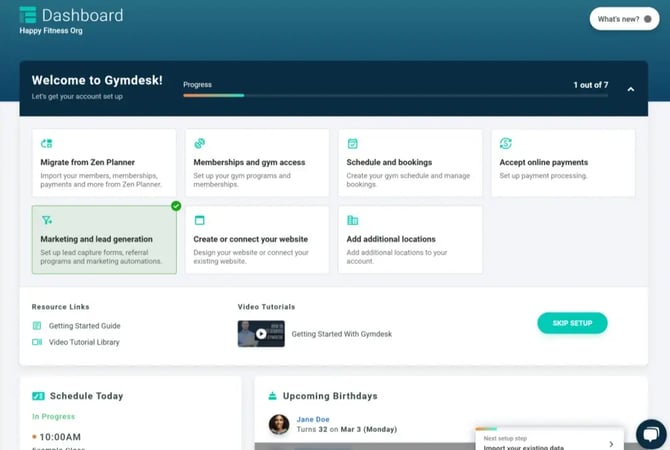
必ずしもこれらのセクションをすべて完了させる必要はありません。大部分の設定を完了させれば、Gymdeskを使い始めることができます!
### **ジムのプログラムとスケジュール**
Gym(ジム)タブでは、[ジムのプログラム](https://docs.gymdesk.com/help/gym-programs?hsLang=ja-jp)、予約、スケジュール管理、給与データのダウンロード、管理者やスタッフの追加ができます。
#### **プログラム**
Programs(プログラム)タブから、プログラムを追加するか、登録手続きで入力したプログラムを編集します。各プログラムの名前、種類、レベルやランクの形式をカスタマイズすることができます。
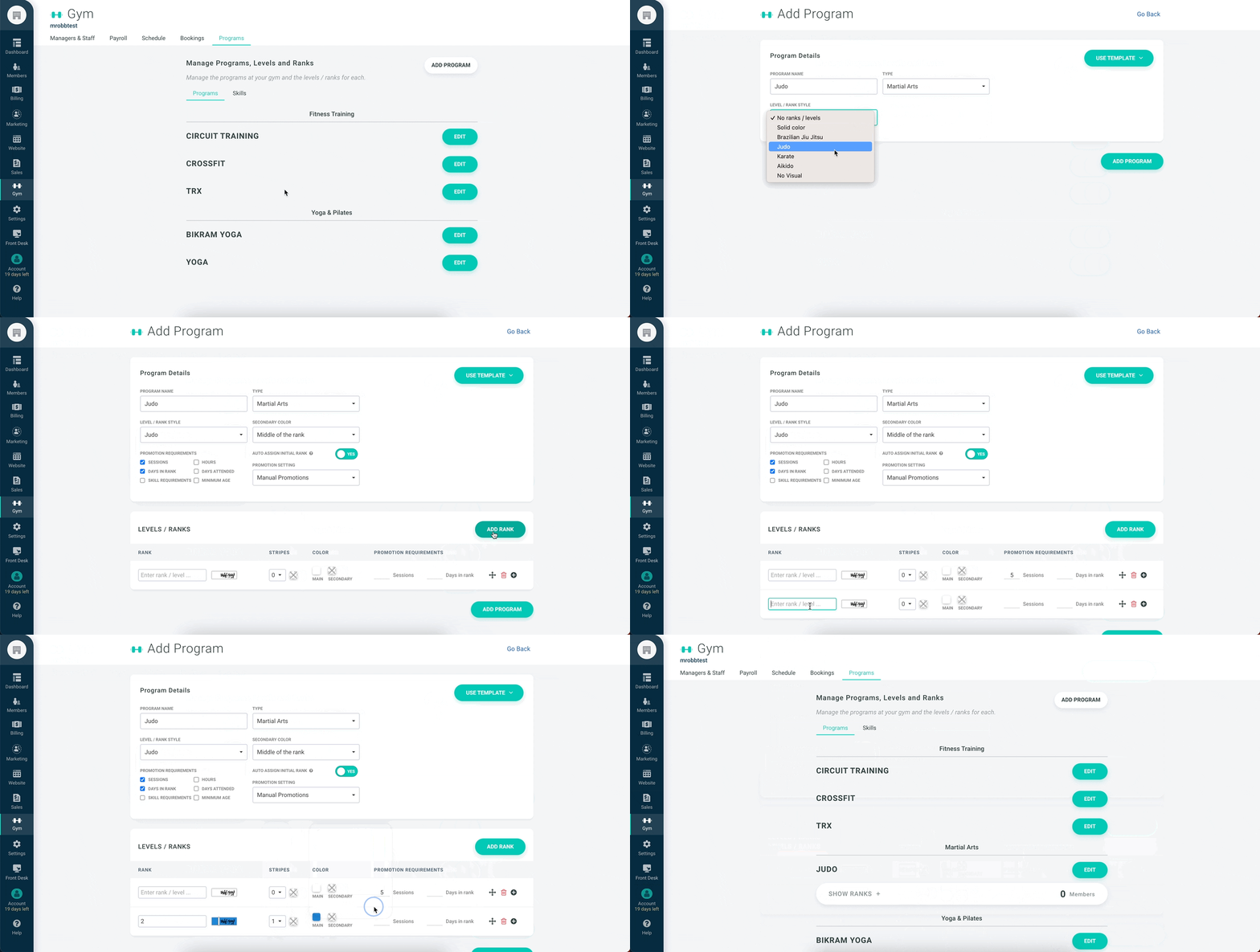
Martial Arts Program(武道・格闘技プログラム)では、階級や色、帯など、さまざまなオプションが表示されます。また、既存のプログラムを編集、複製、削除することもできます。プログラムと階級については、[こちら](https://docs.gymdesk.com/help/gym-programs?hsLang=ja-jp)をご覧ください。
### **スケジュール**
Schedule (スケジュール)タブでは、スタジオで予約可能なセッションを企画し、日付、時間、回数、メンバーへの公開などを設定することができます。また、休館日を指定することも可能です。
まず、左側のドロップダウンですべてのプログラムのスケジュールを作成するか、特定のプログラムのスケジュールを作成するかを選択し、右側のドロップダウンでセッションを選択してスケジュールに追加します。カレンダーで日付を選択すると、セッションが追加されます。
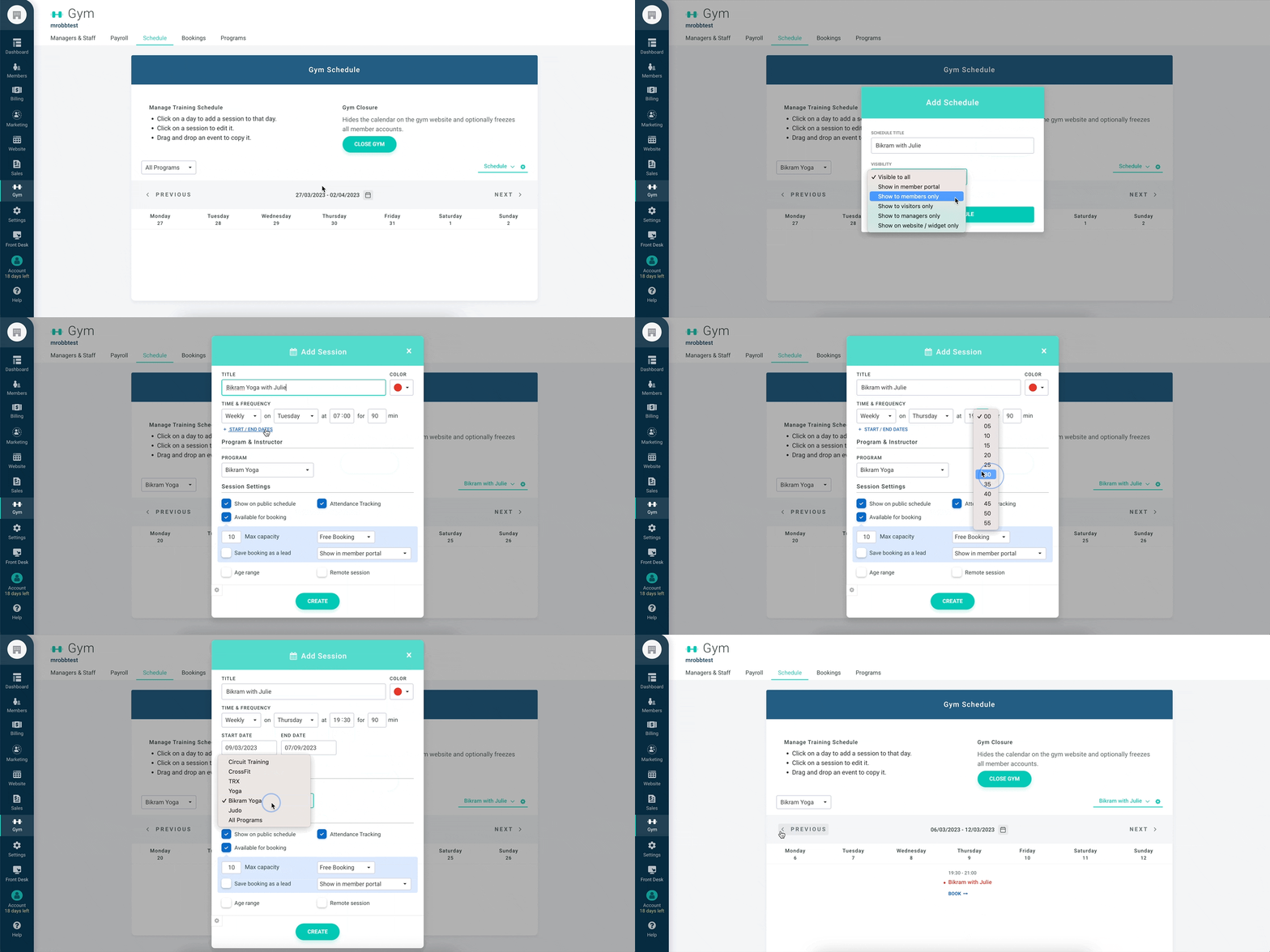
右側の緑の歯車のアイコンをクリックすると、スケジュールのタイトルを編集したり、公開範囲を変更したり、既存のスケジュールを削除することができます。スケジュール管理について詳しくは[こちら](https://docs.gymdesk.com/help/schedule?hsLang=ja-jp)をご覧ください。
### **管理者とスタッフ**
Managers & Staff(管理者とスタッフ)タブでは、スタッフの種別を選択し、個人の経歴詳細、役職、給料、アカウントへのアクセスレベルを設定して、スタッフを追加することができます。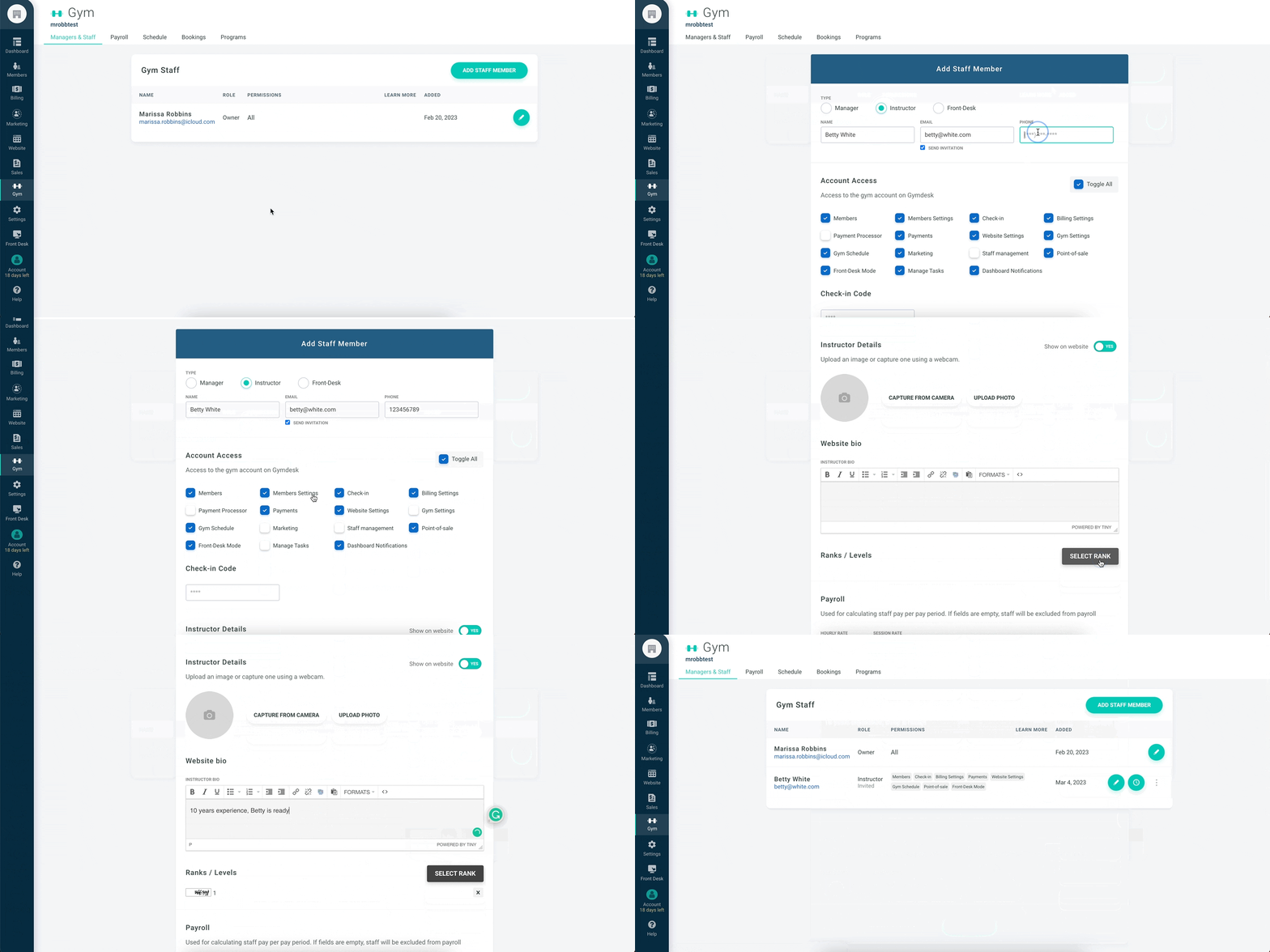スタッフを追加することで、スタッフはアカウントにアクセスし、予約、メンバー、セッションの管理など、Gymdeskで必要なものすべてを管理できるようになり、より良いサービスを提供することが可能となります。一度追加されたスタッフはスケジュールに表示されます。スタッフが追加されたら、名前の右側にある緑色の時計のアイコンをクリックし、給与計算のために勤怠管理を行えます。詳しいスタッフの管理方法については[こちら](https://docs.gymdesk.com/help/managers?hsLang=ja-jp)をご覧ください。
### **請求と支払い**
[Billing Settings(請求設定)](https://gymdesk.com/manager/billing/settings)のページでは、請求通貨や支払いの設定、税金の設定、インボイスや領収書のカスタマイズ、決済サービスをGymdeskアカウントに接続することができます。
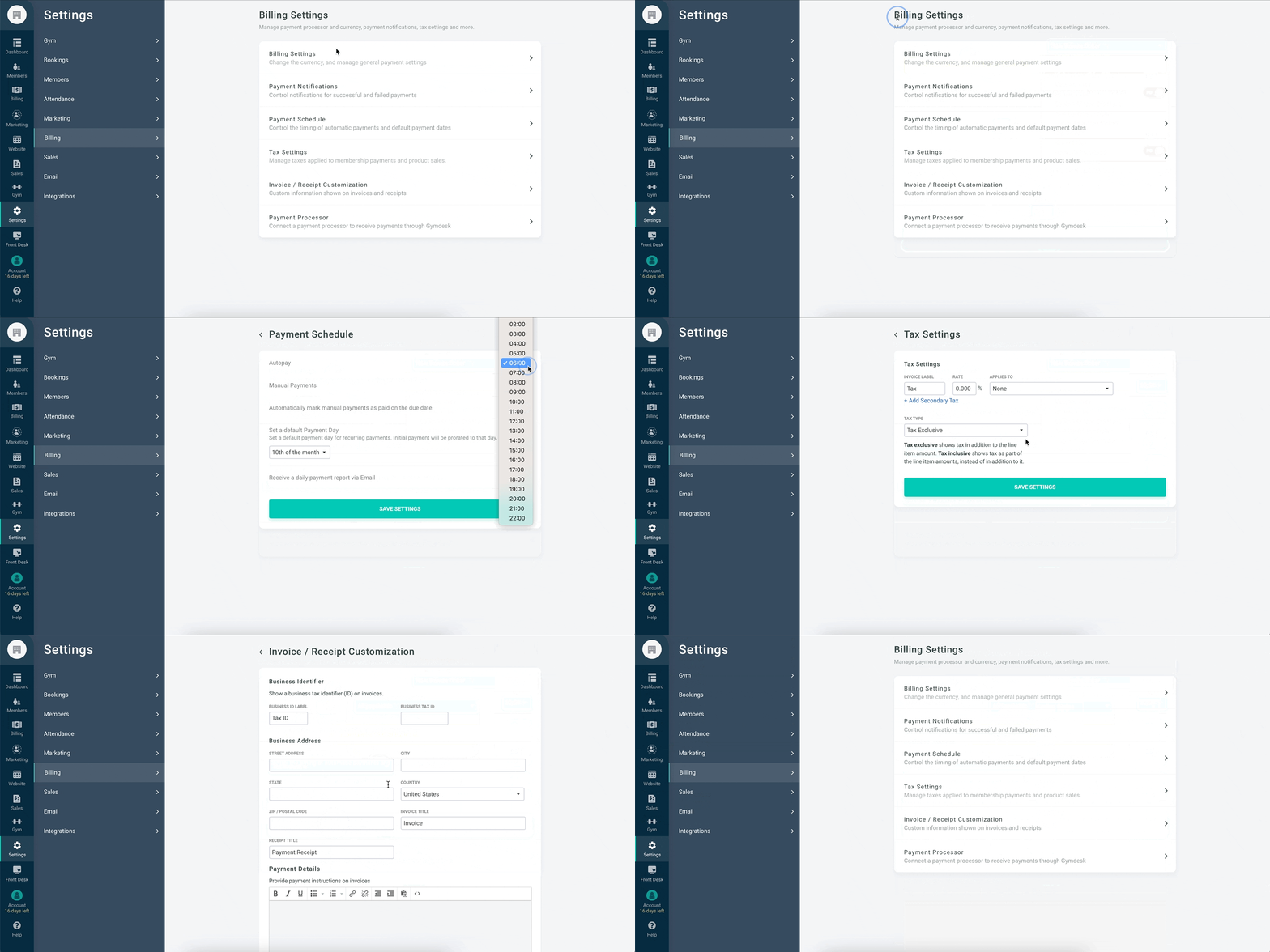
Payment Processor(決済代行会社)セクションから、現在ご利用の決済代行会社に応じて決済処理の設定を行ってください。弊社では、Square、Authorize.net、Stripe、GoCardlessと統合しています。支払い処理について詳しくは[こちら](https://docs.gymdesk.com/help/payment-processing?hsLang=ja-jp)をご覧ください。
アカウントの支払い設定については、[こちら](https://docs.gymdesk.com/help/billing-setup?hsLang=ja-jp)をご覧ください。
### **メンバーシップ**
Gymdeskを導入する大きな利点の一つが、スタジオで会員が利用できる様々な[メンバーシップのオプション](https://gymdesk.com/manager/memberships/manage)を設定・追加できることです。
下の画像は、5セッション分の回数券を作成した例です。この回数券を購入すると、会員はスタジオで5回のセッションを期間無制限で受けることができます。
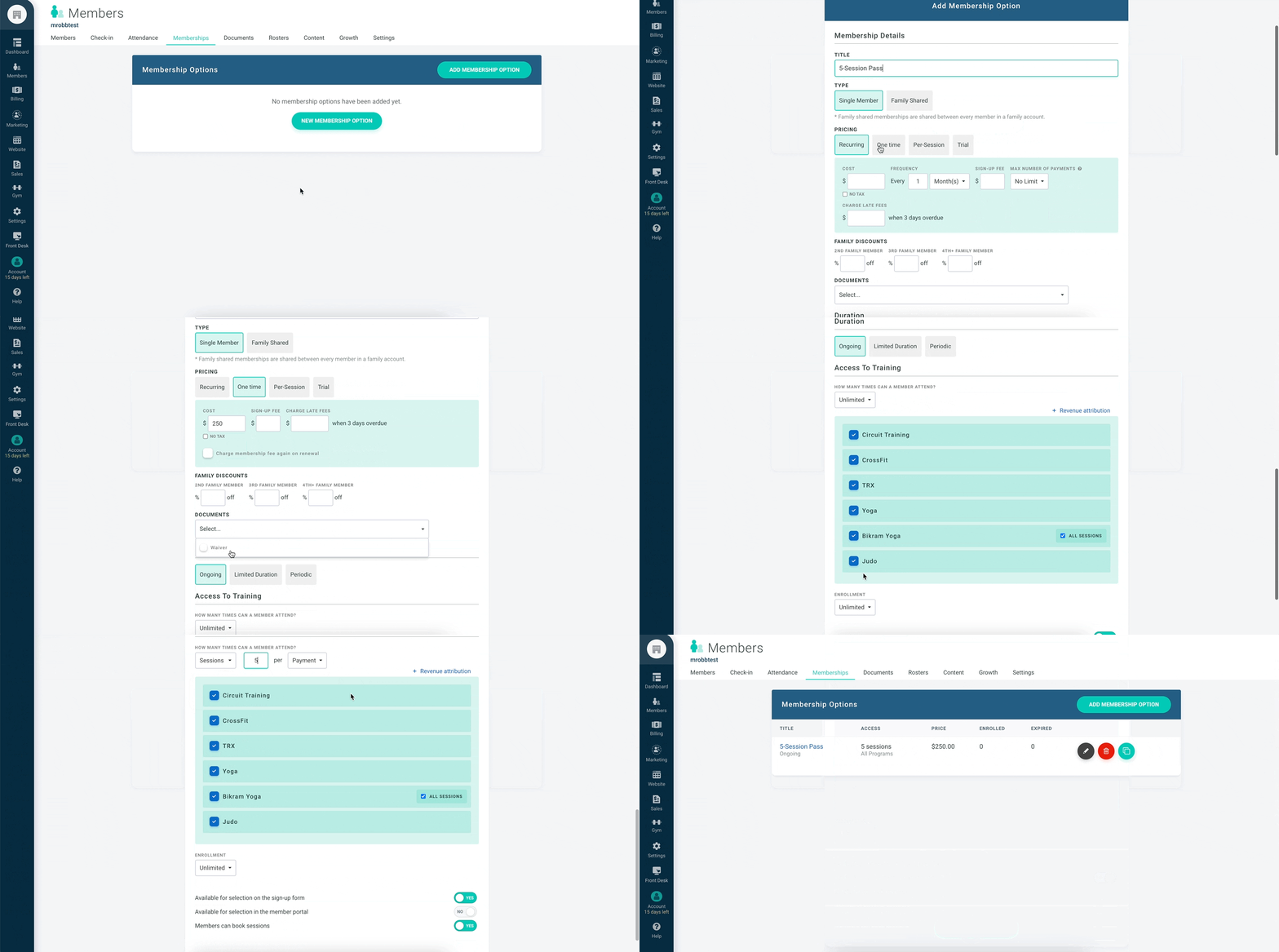
これは、Gymdeskで人気のある機能の1つです。メンバーシップオプションについて詳しくは[こちら](https://docs.gymdesk.com/help/membership-options?hsLang=ja-jp)をご覧ください。
### **会員データのインポートと追加**
[Members view(メンバービュー)](https://gymdesk.com/manager/members/list)からアカウントにメンバーを追加する方法はいくつかあります。会員を一人ずつ追加したり、[フロントデスクモード](https://docs.gymdesk.com/help/front-desk?hsLang=ja-jp)をオンにしてフロントデスクで会員情報を記入してもらったり、CSVファイル経由でインポートしたり、Eメールで招待したりすることができます。
最も一般的なのは、CSVファイル経由で会員情報をインポートする方法です。その方法については[こちら](https://docs.gymdesk.com/help/migration?hsLang=ja-jp)をご覧ください。
### **ウェブサイトの設定**
Website(ウェブサイト)タブでは、ジムのウェブサイトを設定・作成したり、ご自身のウェブサイトやドメインをアカウントに接続することができます。カラースキームの設定、ロゴのアップロード、ソーシャルアカウントの接続、サイトナビゲーションリンクの順序および見栄えの調整、Google Analytics用のスクリプトの追加ができます。
.gif?width=670&height=335&name=websitesettings%20(1).gif)
また、ホームページのコンテンツ管理、インストラクターの追加、場所の指定、スケジュールへの具体的な説明の追加、リードを獲得するためのフォーム作成、ギャラリーへの写真のアップロード、価格オプションの設定なども可能です。
Gymdeskのウェブサイト設定について詳しくは[こちら](https://gymdeskdev.com/help/website#settings)をご覧ください。
Gymdeskを使い始めるにあたってのサポートについては、[マニュアル](https://docs.gymdesk.com/help/docs?hsLang=ja-jp)をご覧になるか、お気軽に[サポート](https://docs.gymdesk.com/help/book-time?hsLang=ja-jp)チームにお問い合わせください。
- [Getting started](https://docs.gymdesk.com/ja-jp/help/getting-started?hsLang=ja-jp#main-content)
- [Data & Payments Migration](https://docs.gymdesk.com/ja-jp/help/getting-started?hsLang=ja-jp#data-payments-migration)
- [Account](https://docs.gymdesk.com/ja-jp/help/account?hsLang=ja-jp)
- [Gym](https://docs.gymdesk.com/ja-jp/help/gym?hsLang=ja-jp#main-content)
- [Schedule & Booking Management](https://docs.gymdesk.com/ja-jp/help/gym?hsLang=ja-jp#schedule-booking-management)
- [Staff Management](https://docs.gymdesk.com/ja-jp/help/gym?hsLang=ja-jp#staff-management)
- [Ranks & Promotions](https://docs.gymdesk.com/ja-jp/help/gym?hsLang=ja-jp#ranks-promotions)
- [Members](https://docs.gymdesk.com/ja-jp/help/members?hsLang=ja-jp#main-content)
- [Membership Structure & Setup](https://docs.gymdesk.com/ja-jp/help/members?hsLang=ja-jp#membership-structure-setup)
- [Member Payments](https://docs.gymdesk.com/ja-jp/help/members?hsLang=ja-jp#member-payments)
- [Member Portals & Apps](https://docs.gymdesk.com/ja-jp/help/members?hsLang=ja-jp#member-portals-apps)
- [Attendance Tracking & Check-Ins](https://docs.gymdesk.com/ja-jp/help/members?hsLang=ja-jp#attendance-tracking-check-ins)
- [Billing](https://docs.gymdesk.com/ja-jp/help/billing?hsLang=ja-jp#main-content)
- [Payment Processing](https://docs.gymdesk.com/ja-jp/help/billing?hsLang=ja-jp#payment-processing)
- [Billing Settings & Discounts](https://docs.gymdesk.com/ja-jp/help/billing?hsLang=ja-jp#billing-settings-discounts)
- [Marketing](https://docs.gymdesk.com/ja-jp/help/marketing?hsLang=ja-jp#main-content)
- [Email & Text Messaging](https://docs.gymdesk.com/ja-jp/help/marketing?hsLang=ja-jp#email-text-messaging)
- [Lead Management & Automations](https://docs.gymdesk.com/ja-jp/help/marketing?hsLang=ja-jp#lead-management-automations)
- [Gym Websites](https://docs.gymdesk.com/ja-jp/help/gym-websites?hsLang=ja-jp)
- [Point of Sales](https://docs.gymdesk.com/ja-jp/help/point-of-sales?hsLang=ja-jp)
- [Integrations](https://docs.gymdesk.com/ja-jp/help/integrations?hsLang=ja-jp)
- [Gymdesk Documentation & Policies](https://docs.gymdesk.com/ja-jp/help/gymdesk-documentation-policies?hsLang=ja-jp)
- [Company](https://gymdesk.com/)
- [About us](https://gymdesk.com/content/about)
- [Contact us](https://gymdesk.com/contact)
- [Resources](https://gymdesk.com/blog/)
- [Features](https://gymdesk.com/)
- [Memberships](https://gymdesk.com/features/members)
- [Billing](https://gymdesk.com/features/billing)
- [Attendance](https://gymdesk.com/features/attendance)
- [Booking](https://gymdesk.com/features/booking)
- [Marketing](https://gymdesk.com/features/marketing)
- [Website](https://gymdesk.com/features/website)
- [Point-of-sale](https://gymdesk.com/features/pos)
- [Reporting](https://gymdesk.com/features/reporting)
- [Facility access](https://gymdesk.com/features/access)
- [Mobile app](https://gymdesk.com/features/member-app)
- [Integrations](https://gymdesk.com/features/integrations)
- [Gym types](https://gymdesk.com/)
- [Martial arts](https://gymdesk.com/software/martial-arts)
- [Membership clubs](https://gymdesk.com/software/membership-clubs)
- [Yoga studios](https://gymdesk.com/software/yoga)
- [Pilates studios](https://gymdesk.com/software/pilates)
- [Fitness gyms](https://gymdesk.com/software/gyms)
- [Gymnastics gyms](https://gymdesk.com/software/gymnastics)
- [Dance studios](https://gymdesk.com/software/dance)
- [Crossfit gyms](https://gymdesk.com/software/crossfit)
- [Resources](https://gymdesk.com/)
- [Our Customers](https://gymdesk.com/customers)
- [Documentation](https://docs.gymdesk.com/help/docs)
- [Pricing](https://gymdesk.com/pricing)
- [Membership contract template](https://gymdesk.com/lp/contract-template)
- [Black belt widget](https://gymdesk.com/lp/bbwidget)
- [Gym software guide](https://gymdesk.com/best-gym-management-software)
- [Trust center](https://gymdesk.com/page/trust)
- [Terms of service](https://gymdesk.com/page/terms)
- [Privacy policy](https://gymdesk.com/page/privacy)
- [Comparison](https://gymdesk.com/)
- [Mindbody](https://gymdesk.com/alternative/mindbody)
- [Jackrabbit](https://gymdesk.com/alternative/jackrabbit)
- [Zenplanner](https://gymdesk.com/alternative/zenplanner)
- [Kicksite](https://gymdesk.com/alternative/kicksite)
- [Spark membership](https://gymdesk.com/alternative/spark)
- [Pushpress](https://gymdesk.com/alternative/pushpress)
- [Gymmaster](https://gymdesk.com/alternative/gymmaster)
- [Glofox](https://gymdesk.com/alternative/glofox)
- [Hapana](https://gymdesk.com/alternative/hapana)
- [Mariana Tek](https://gymdesk.com/alternative/marianatek)
- [Momence](https://gymdesk.com/alternative/momence)
[](https://gymdesk.com/)
Built and run in Austin, TX
Copyright © 2025