
The Gymdesk Member App puts your gym directly in your members’ pockets. Through the app, members can view class schedules, book sessions, manage their membership and payments, track their attendance, and stay up to date with announcements from your gym — all from their phone.
The Member App provides the same experience as the web-based Member Portal, so members can access and manage their accounts seamlessly from either their mobile device or their desktop. This guide walks through the main features available in the Member App.
Overview of The Member App Features
Whether your members use the standard Gymdesk Member App or your own Branded Member App, they’ll have access to the same core features and functionality. (Some features may be optionally disabled within your Gymdesk account). The list below highlights the features available in the Member App:
- View and Update Member Profile
- View Class Schedules
- Book Classes or Join Waitlists
- Manage Memberships
- Update or Add New Payment Methods
- View Scheduled or Past Payments
- Mobile Class Check-In
- Mobile Door Access
- View and Receive Push Notifications
- Sign Waivers or Other Documents
- View Exclusive Member Content
- Send and Receive Messages
Member Profile and Billing
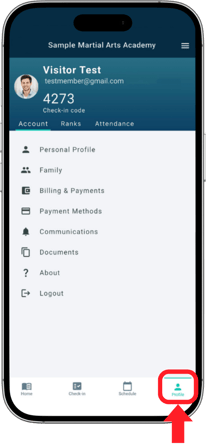
Members can manage their personal and billing details directly from the Profile tab of the Member App. They can update contact information, manage linked family members, view membership details, current rank, review past and upcoming payments, and add or update saved payment methods—all from their phone.
Membership Management
Members can manage important aspects of their membership directly through the member app.Members can view their active memberships and see how much time remains before each one expires. Members may also complete membership renewals or add new memberships directly within the app.
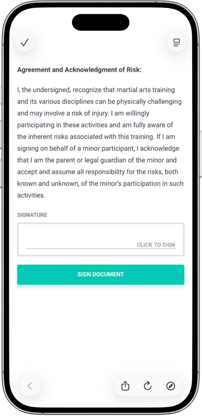
Members can also sign important documents such as waivers or membership agreements right on their phone. This allows members to stay up to date with their accounts and complete any required forms conveniently from their phone.
Class Schedules and Booking
Members can view your gym’s class schedule in the Member App and book classes in advance, including seeing available sessions, instructors, and times. If enabled, they can also join a waitlist for full classes and may be automatically moved into the class when a spot opens, making it easy to manage their training schedule from their phone.
Mobile Class Check-In and Attendance
Members can quickly check in to classes in the Member App using either a personal check-in numerical code or membership card (barcode or QR code), depending on your gym’s setup. Their attendance is automatically recorded in Gymdesk, keeping class rosters accurate, and members can view their attendance history in the app to track their training over time.
Member Communication
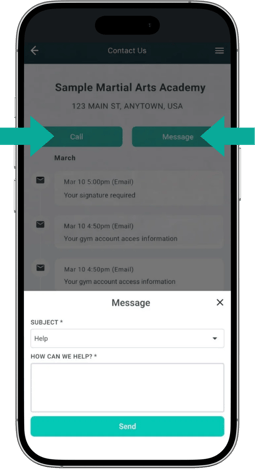
Members can contact your gym directly from the Member App whenever they have a question or need support. By tapping Contact in the menu, members can call your gym or send a message with the tap of a button. If they choose to message, a messaging window opens within the app so they can send their question without leaving the app.
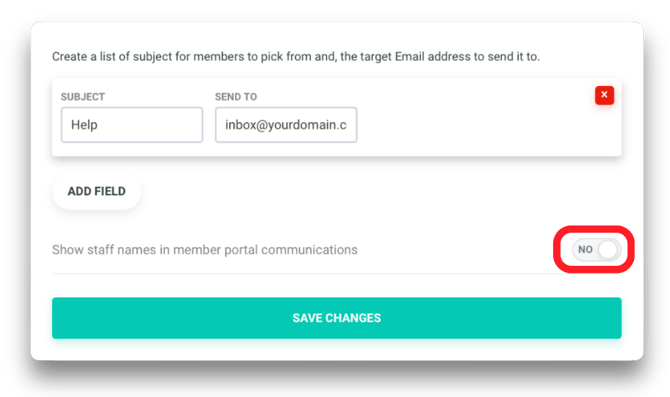
In your Member Portal Settings, you can set the subject line options members see when sending a message (for example, "Help" or "I Have a Question") and choose which email inbox each message goes to for easier organization. You can also choose whether to display the name of the instructor or staff member replying to the message.
Push Notifications
Push notifications are short alerts that appear on a member’s phone screen, similar to text message notifications, even when they’re not actively using the app. With the Gymdesk Member App, members can receive real-time push notifications for important announcements, schedule changes, membership or billing updates, and other account activity—helping them stay informed about what’s happening at your gym.
Door Access
If your gym has Door Access enabled, members can unlock designated doors directly from the Member App. By tapping the Access icon in the navigation bar, members can view available doors and unlock them using their phone. This allows members to enter the facility without needing a physical key or access card, providing a convenient and secure way to access your gym.
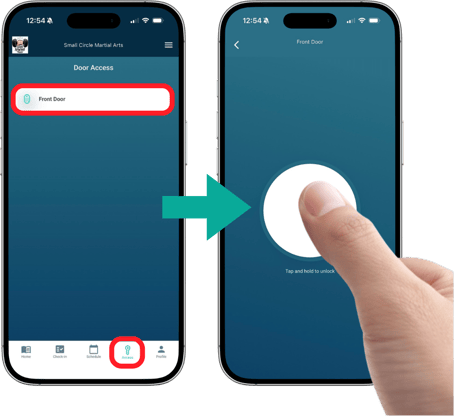
Note: If using KISI for Door Access, you must use the KISI APP.
Member Content
Members can access exclusive gym content in the Member Content section of the Member App, including videos, links, documents, and other resources—so they can quickly find training materials, announcements, and key information from their phone. You can organize content into categories and set visibility rules so only specific members or programs see what’s relevant to them.
In Member Content Settings, you can choose how content is displayed (list or grid), set the sort order (newest first, alphabetical, or custom), and rename the section to fit your gym, such as Student Resources or Training Videos.