---
title: Marketing Dashboard
description: Analyze lead generation and source performance in the Gymdesk Marketing Dashboard to see which channels drive new prospects.
---
[Skip to content](https://docs.gymdesk.com/en/help/docs/marketing-dashboard#main-content)
- [English](https://docs.gymdesk.com/en/help/docs/marketing-dashboard)
- [日本語 - 日本](https://docs.gymdesk.com/ja-jp/help/marketing-dashboard)
English
Show submenu for translations
[](https://gymdesk.com/)
- GYM TYPES
Show submenu for GYM TYPES
- [Fitness gyms software](https://gymdesk.com/software/gyms)
- [Martial arts schools software](https://gymdesk.com/software/martial-arts)
- [Gymnastics software](https://gymdesk.com/software/gymnastics)
- [Yoga studios software](https://gymdesk.com/software/yoga)
- [Dance studios software](https://gymdesk.com/software/dance)
- [Pilates studio software](https://gymdesk.com/software/pilates)
- [Club management software](https://gymdesk.com/software/membership-clubs)
- [Crossfit gym software](https://gymdesk.com/software/crossfit)
- FEATURES
Show submenu for FEATURES
- [Memberships](https://gymdesk.com/features/members)
- [Billing](https://gymdesk.com/features/billing)
- [Attendance](https://gymdesk.com/features/attendance)
- [Booking](https://gymdesk.com/features/booking)
- [Website](https://gymdesk.com/features/website)
- [Point-of-Sale](https://gymdesk.com/features/pos)
- [Marketing](https://gymdesk.com/features/marketing)
- [Reporting](https://gymdesk.com/features/reporting)
- [Facility Access](https://gymdesk.com/features/access)
- [Mobile App](https://gymdesk.com/features/member-app)
- [Integrations](https://gymdesk.com/features/integrations)
- RESOURCES
Show submenu for RESOURCES
- [Articles on growing a fitness business](https://gymdesk.com/blog/)
- [Gyms](https://gymdesk.com/blog/category/gyms/)
- [Martial Arts](https://gymdesk.com/blog/category/martial-arts/)
- [Yoga](https://gymdesk.com/blog/category/yoga/)
- [Gymnastics](https://gymdesk.com/blog/category/gymnastics/)
- [Dance](https://gymdesk.com/blog/category/dance/)
- [Pilates](https://gymdesk.com/blog/category/pilates/)
- [Sports clubs](https://gymdesk.com/blog/category/sport-clubs/)
- [The gym heroes podcast](https://gymdesk.com/blog/category/podcasts/)
- [CUSTOMERS](https://gymdesk.com/customers)
- [PRICING](https://gymdesk.com/pricing)
- [CONTACT](https://gymdesk.com/contact)
- [LOGIN](https://gymdesk.com/login)
Open main navigation
Close main navigation
- GYM TYPES
Show submenu for GYM TYPES
- [Fitness gyms software](https://gymdesk.com/software/gyms)
- [Martial arts schools software](https://gymdesk.com/software/martial-arts)
- [Gymnastics software](https://gymdesk.com/software/gymnastics)
- [Yoga studios software](https://gymdesk.com/software/yoga)
- [Dance studios software](https://gymdesk.com/software/dance)
- [Pilates studio software](https://gymdesk.com/software/pilates)
- [Club management software](https://gymdesk.com/software/membership-clubs)
- [Crossfit gym software](https://gymdesk.com/software/crossfit)
- FEATURES
Show submenu for FEATURES
- [Memberships](https://gymdesk.com/features/members)
- [Billing](https://gymdesk.com/features/billing)
- [Attendance](https://gymdesk.com/features/attendance)
- [Booking](https://gymdesk.com/features/booking)
- [Website](https://gymdesk.com/features/website)
- [Point-of-Sale](https://gymdesk.com/features/pos)
- [Marketing](https://gymdesk.com/features/marketing)
- [Reporting](https://gymdesk.com/features/reporting)
- [Facility Access](https://gymdesk.com/features/access)
- [Mobile App](https://gymdesk.com/features/member-app)
- [Integrations](https://gymdesk.com/features/integrations)
- RESOURCES
Show submenu for RESOURCES
- [Articles on growing a fitness business](https://gymdesk.com/blog/)
- [Gyms](https://gymdesk.com/blog/category/gyms/)
- [Martial Arts](https://gymdesk.com/blog/category/martial-arts/)
- [Yoga](https://gymdesk.com/blog/category/yoga/)
- [Gymnastics](https://gymdesk.com/blog/category/gymnastics/)
- [Dance](https://gymdesk.com/blog/category/dance/)
- [Pilates](https://gymdesk.com/blog/category/pilates/)
- [Sports clubs](https://gymdesk.com/blog/category/sport-clubs/)
- [The gym heroes podcast](https://gymdesk.com/blog/category/podcasts/)
- [CUSTOMERS](https://gymdesk.com/customers)
- [PRICING](https://gymdesk.com/pricing)
- [CONTACT](https://gymdesk.com/contact)
- [LOGIN](https://gymdesk.com/login)
- - [English](https://docs.gymdesk.com/en/help/docs/marketing-dashboard)
- [日本語 - 日本](https://docs.gymdesk.com/ja-jp/help/marketing-dashboard)
English
Show submenu for translations
- [Sign-Up](https://gymdesk.com/register)
[Sign-Up](https://gymdesk.com/register)
How can we help you?
- There are no suggestions because the search field is empty.
1. [Gymdesk Help](https://docs.gymdesk.com/en/help/docs?hsLang=en)
2. [Marketing](https://docs.gymdesk.com/en/help/docs/marketing?hsLang=en)
# Marketing Dashboard
### **The Marketing Dashboard**
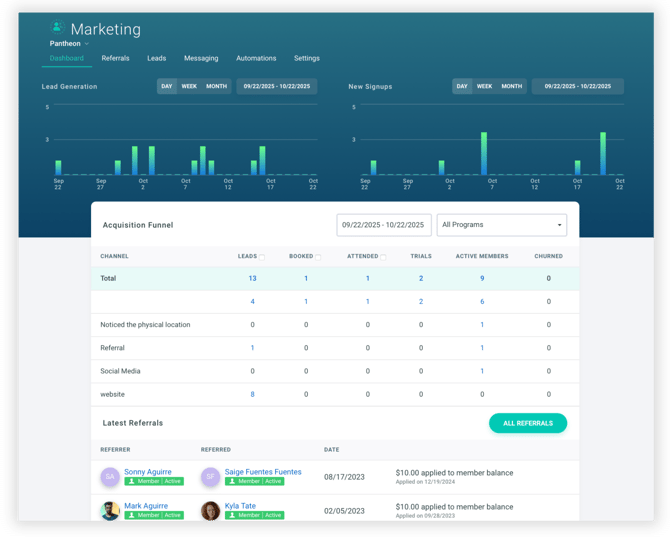
The marketing dashboard provides an overview of your lead generation and member acquisition efforts. It highlights how many leads have been collected, how many have booked or attended a trial, and which marketing sources are performing best.
### **Lead Generation and New Signups**
At the top of the dashboard, you’ll see two charts:
- **Lead Generation** – shows leads captured from your website or other forms
- **New Signups** – shows new members or visitors who completed a signup form
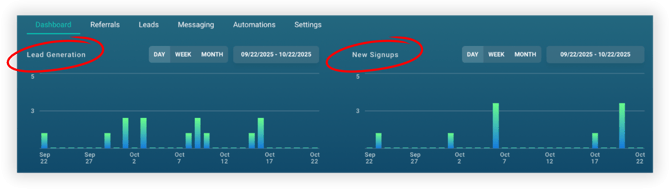
This section provides a visual summary of your lead activity and signups over time. You can switch between **Day, Week, or Month** views, and select a **custom date range** to analyze trends over time.
### **Acquisition Funnel**
Beneath the charts, the **Acquisition Funnel** details how your marketing sources (such as your website, referrals, social media, and other channels) are driving leads through each funnel stage.
Use the labeled checkboxes to filter the data shown in the table:
- **Leads** – contacts who first entered your system as a lead.
- **Booked** – leads who scheduled a trial or intro class.
- **Attended** – leads who showed up for their scheduled session.
When you check or uncheck these boxes, the dashboard updates to show how many contacts entered the funnel at each specific stage.
**Note:** The Marketing Dashboard tracks data **exclusively from leads**, not existing members. If a current member books a class or appointment, that information will be available in other areas like the *Bookings View* or in *Data Exports*.
### **Latest Referrals**
At the bottom of the dashboard, you’ll see the **Latest Referrals** section. This area lists the five (5) most recent member referrals, including:
- The member who made the referral
- The member who was referred
- The date of the referral
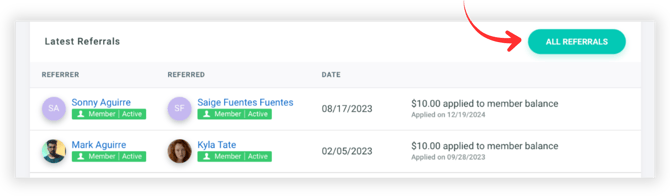
If [Referral Rewards](https://docs.gymdesk.com/en/help/docs/referral-rewards?hsLang=en)are enabled in your settings, any credits applied to member balances will appear in the final column. To see the complete referral history, select **All Referrals**.
- [Gymdesk Glossary](https://docs.gymdesk.com/en/help/docs/gymdesk-glossary?hsLang=en)
- [Getting started](https://docs.gymdesk.com/en/help/docs/getting-started?hsLang=en#main-content)
- [General Overview](https://docs.gymdesk.com/en/help/docs/getting-started?hsLang=en#general-overview)
- [Data & Payments Migration](https://docs.gymdesk.com/en/help/docs/getting-started?hsLang=en#data-payments-migration)
- [Account](https://docs.gymdesk.com/en/help/docs/account?hsLang=en)
- [Gym](https://docs.gymdesk.com/en/help/docs/gym?hsLang=en#main-content)
- [Schedule & Booking Management](https://docs.gymdesk.com/en/help/docs/gym?hsLang=en#schedule-booking-management)
- [Staff Management](https://docs.gymdesk.com/en/help/docs/gym?hsLang=en#staff-management)
- [Ranks & Promotions](https://docs.gymdesk.com/en/help/docs/gym?hsLang=en#ranks-promotions)
- [Members](https://docs.gymdesk.com/en/help/docs/members?hsLang=en#main-content)
- [Membership Structure & Setup](https://docs.gymdesk.com/en/help/docs/members?hsLang=en#membership-structure-setup)
- [Member Payments](https://docs.gymdesk.com/en/help/docs/members?hsLang=en#member-payments)
- [Member Portals & Apps](https://docs.gymdesk.com/en/help/docs/members?hsLang=en#member-portals-apps)
- [Attendance Tracking & Check-Ins](https://docs.gymdesk.com/en/help/docs/members?hsLang=en#attendance-tracking-check-ins)
- [Creating Membership Plans](https://docs.gymdesk.com/en/help/docs/members?hsLang=en#creating-membership-plans)
- [Billing](https://docs.gymdesk.com/en/help/docs/billing?hsLang=en#main-content)
- [Payment Processing](https://docs.gymdesk.com/en/help/docs/billing?hsLang=en#payment-processing)
- [Billing Settings & Discounts](https://docs.gymdesk.com/en/help/docs/billing?hsLang=en#billing-settings-discounts)
- [Accounting](https://docs.gymdesk.com/en/help/docs/billing?hsLang=en#accounting)
- [Marketing](https://docs.gymdesk.com/en/help/docs/marketing?hsLang=en#main-content)
- [Email & Text Messaging](https://docs.gymdesk.com/en/help/docs/marketing?hsLang=en#email-text-messaging)
- [Lead Management & Automations](https://docs.gymdesk.com/en/help/docs/marketing?hsLang=en#lead-management-automations)
- [Gym Websites](https://docs.gymdesk.com/en/help/docs/gym-websites?hsLang=en)
- [Sales](https://docs.gymdesk.com/en/help/docs/sales?hsLang=en)
- [Competition Management](https://docs.gymdesk.com/en/help/docs/competition-management?hsLang=en)
- [Integrations](https://docs.gymdesk.com/en/help/docs/integrations?hsLang=en)
- [Gymdesk Documentation & Policies](https://docs.gymdesk.com/en/help/docs/gymdesk-documentation-policies?hsLang=en)
- [Company](https://gymdesk.com/)
- [About us](https://gymdesk.com/content/about)
- [Contact us](https://gymdesk.com/contact)
- [Resources](https://gymdesk.com/blog/)
- [Features](https://gymdesk.com/)
- [Memberships](https://gymdesk.com/features/members)
- [Billing](https://gymdesk.com/features/billing)
- [Attendance](https://gymdesk.com/features/attendance)
- [Booking](https://gymdesk.com/features/booking)
- [Marketing](https://gymdesk.com/features/marketing)
- [Website](https://gymdesk.com/features/website)
- [Point-of-sale](https://gymdesk.com/features/pos)
- [Reporting](https://gymdesk.com/features/reporting)
- [Facility access](https://gymdesk.com/features/access)
- [Mobile app](https://gymdesk.com/features/member-app)
- [Integrations](https://gymdesk.com/features/integrations)
- [Gym types](https://gymdesk.com/)
- [Martial arts](https://gymdesk.com/software/martial-arts)
- [Membership clubs](https://gymdesk.com/software/membership-clubs)
- [Yoga studios](https://gymdesk.com/software/yoga)
- [Pilates studios](https://gymdesk.com/software/pilates)
- [Fitness gyms](https://gymdesk.com/software/gyms)
- [Gymnastics gyms](https://gymdesk.com/software/gymnastics)
- [Dance studios](https://gymdesk.com/software/dance)
- [Crossfit gyms](https://gymdesk.com/software/crossfit)
- [Resources](https://gymdesk.com/)
- [Our Customers](https://gymdesk.com/customers)
- [Documentation](https://docs.gymdesk.com/help/docs)
- [Pricing](https://gymdesk.com/pricing)
- [Membership contract template](https://gymdesk.com/lp/contract-template)
- [Black belt widget](https://gymdesk.com/lp/bbwidget)
- [Gym software guide](https://gymdesk.com/best-gym-management-software)
- [Trust center](https://gymdesk.com/page/trust)
- [Terms of service](https://gymdesk.com/page/terms)
- [Privacy policy](https://gymdesk.com/page/privacy)
- [Comparison](https://gymdesk.com/)
- [Mindbody](https://gymdesk.com/alternative/mindbody)
- [Jackrabbit](https://gymdesk.com/alternative/jackrabbit)
- [Zenplanner](https://gymdesk.com/alternative/zenplanner)
- [Kicksite](https://gymdesk.com/alternative/kicksite)
- [Spark membership](https://gymdesk.com/alternative/spark)
- [Pushpress](https://gymdesk.com/alternative/pushpress)
- [Gymmaster](https://gymdesk.com/alternative/gymmaster)
- [Glofox](https://gymdesk.com/alternative/glofox)
- [Hapana](https://gymdesk.com/alternative/hapana)
- [Mariana Tek](https://gymdesk.com/alternative/marianatek)
- [Momence](https://gymdesk.com/alternative/momence)
[](https://gymdesk.com/)
Built and run in Austin, TX
Copyright © 2025