---
title: Setting Up a Custom Email Domain
description: Setting Up a Custom Email Domain
---
[Skip to content](https://docs.gymdesk.com/en/help/docs/email-domain#main-content)
- [English](https://docs.gymdesk.com/en/help/docs/email-domain)
- [日本語 - 日本](https://docs.gymdesk.com/ja-jp/help/カスタムメ-ルドメインの設定)
English
Show submenu for translations
[](https://gymdesk.com/)
- GYM TYPES
Show submenu for GYM TYPES
- [Fitness gyms software](https://gymdesk.com/software/gyms)
- [Martial arts schools software](https://gymdesk.com/software/martial-arts)
- [Gymnastics software](https://gymdesk.com/software/gymnastics)
- [Yoga studios software](https://gymdesk.com/software/yoga)
- [Dance studios software](https://gymdesk.com/software/dance)
- [Pilates studio software](https://gymdesk.com/software/pilates)
- [Club management software](https://gymdesk.com/software/membership-clubs)
- [Crossfit gym software](https://gymdesk.com/software/crossfit)
- FEATURES
Show submenu for FEATURES
- [Memberships](https://gymdesk.com/features/members)
- [Billing](https://gymdesk.com/features/billing)
- [Attendance](https://gymdesk.com/features/attendance)
- [Booking](https://gymdesk.com/features/booking)
- [Website](https://gymdesk.com/features/website)
- [Point-of-Sale](https://gymdesk.com/features/pos)
- [Marketing](https://gymdesk.com/features/marketing)
- [Reporting](https://gymdesk.com/features/reporting)
- [Facility Access](https://gymdesk.com/features/access)
- [Mobile App](https://gymdesk.com/features/member-app)
- [Integrations](https://gymdesk.com/features/integrations)
- RESOURCES
Show submenu for RESOURCES
- [Articles on growing a fitness business](https://gymdesk.com/blog/)
- [Gyms](https://gymdesk.com/blog/category/gyms/)
- [Martial Arts](https://gymdesk.com/blog/category/martial-arts/)
- [Yoga](https://gymdesk.com/blog/category/yoga/)
- [Gymnastics](https://gymdesk.com/blog/category/gymnastics/)
- [Dance](https://gymdesk.com/blog/category/dance/)
- [Pilates](https://gymdesk.com/blog/category/pilates/)
- [Sports clubs](https://gymdesk.com/blog/category/sport-clubs/)
- [The gym heroes podcast](https://gymdesk.com/blog/category/podcasts/)
- [CUSTOMERS](https://gymdesk.com/customers)
- [PRICING](https://gymdesk.com/pricing)
- [CONTACT](https://gymdesk.com/contact)
- [LOGIN](https://gymdesk.com/login)
Open main navigation
Close main navigation
- GYM TYPES
Show submenu for GYM TYPES
- [Fitness gyms software](https://gymdesk.com/software/gyms)
- [Martial arts schools software](https://gymdesk.com/software/martial-arts)
- [Gymnastics software](https://gymdesk.com/software/gymnastics)
- [Yoga studios software](https://gymdesk.com/software/yoga)
- [Dance studios software](https://gymdesk.com/software/dance)
- [Pilates studio software](https://gymdesk.com/software/pilates)
- [Club management software](https://gymdesk.com/software/membership-clubs)
- [Crossfit gym software](https://gymdesk.com/software/crossfit)
- FEATURES
Show submenu for FEATURES
- [Memberships](https://gymdesk.com/features/members)
- [Billing](https://gymdesk.com/features/billing)
- [Attendance](https://gymdesk.com/features/attendance)
- [Booking](https://gymdesk.com/features/booking)
- [Website](https://gymdesk.com/features/website)
- [Point-of-Sale](https://gymdesk.com/features/pos)
- [Marketing](https://gymdesk.com/features/marketing)
- [Reporting](https://gymdesk.com/features/reporting)
- [Facility Access](https://gymdesk.com/features/access)
- [Mobile App](https://gymdesk.com/features/member-app)
- [Integrations](https://gymdesk.com/features/integrations)
- RESOURCES
Show submenu for RESOURCES
- [Articles on growing a fitness business](https://gymdesk.com/blog/)
- [Gyms](https://gymdesk.com/blog/category/gyms/)
- [Martial Arts](https://gymdesk.com/blog/category/martial-arts/)
- [Yoga](https://gymdesk.com/blog/category/yoga/)
- [Gymnastics](https://gymdesk.com/blog/category/gymnastics/)
- [Dance](https://gymdesk.com/blog/category/dance/)
- [Pilates](https://gymdesk.com/blog/category/pilates/)
- [Sports clubs](https://gymdesk.com/blog/category/sport-clubs/)
- [The gym heroes podcast](https://gymdesk.com/blog/category/podcasts/)
- [CUSTOMERS](https://gymdesk.com/customers)
- [PRICING](https://gymdesk.com/pricing)
- [CONTACT](https://gymdesk.com/contact)
- [LOGIN](https://gymdesk.com/login)
- - [English](https://docs.gymdesk.com/en/help/docs/email-domain)
- [日本語 - 日本](https://docs.gymdesk.com/ja-jp/help/カスタムメ-ルドメインの設定)
English
Show submenu for translations
- [Sign-Up](https://gymdesk.com/register)
[Sign-Up](https://gymdesk.com/register)
How can we help you?
- There are no suggestions because the search field is empty.
1. [Gymdesk Help](https://docs.gymdesk.com/en/help/docs?hsLang=en)
2. [Marketing](https://docs.gymdesk.com/en/help/docs/marketing?hsLang=en)
3. [Email & Text Messaging](https://docs.gymdesk.com/en/help/docs/marketing?hsLang=en#email-text-messaging)
# Setting Up a Custom Email Domain
If you use a **Custom Domain** to send & receive emails from Gymdesk, you'll want to ensure you have completed the steps for email domain verification. By navigating to [Settings -\> Email -\> EmailSending / Receiving Address -\> Set Up Email Domain](https://gymdesk.com/manager/email/domain).
Once you start the process, you'll find guidance below on how to setup your email domain within your domain host. On this page, you'll see links for instructions with common providers.
- [GoDaddy](https://www.godaddy.com/help/add-a-txt-record-19232)
- [NameCheap](https://www.namecheap.com/support/knowledgebase/article.aspx/579/2237/which-record-type-option-should-i-choose-for-the-information-im-about-to-enter)
- [Google Domains](https://support.google.com/a/answer/2716802?hl=en)
- [Squarespace](https://support.squarespace.com/hc/en-us/articles/31120985010957-DNS-records-for-email)
- [Wix](https://support.wix.com/en/article/adding-or-updating-txt-records-in-your-wix-account)
- [Digital Ocean](https://www.digitalocean.com/community/tutorials/how-to-create-a-spf-record-for-your-domain-with-google-apps)
#### **Gymdesk Support for Domain Setup**
For help with navigating email domain verification, you can reach our support team by emailing [support@gymdesk.com.](mailto:support@gymdesk.com)
**If your setup involves multiple services**—such as your *DNS manager*, *web hosting platform*, or *email service*—some steps might require you to access tools or settings outside the scope of our direct support. In these situations, our team will guide you through what to do next and provide resources, even if we can’t complete the steps for you directly.
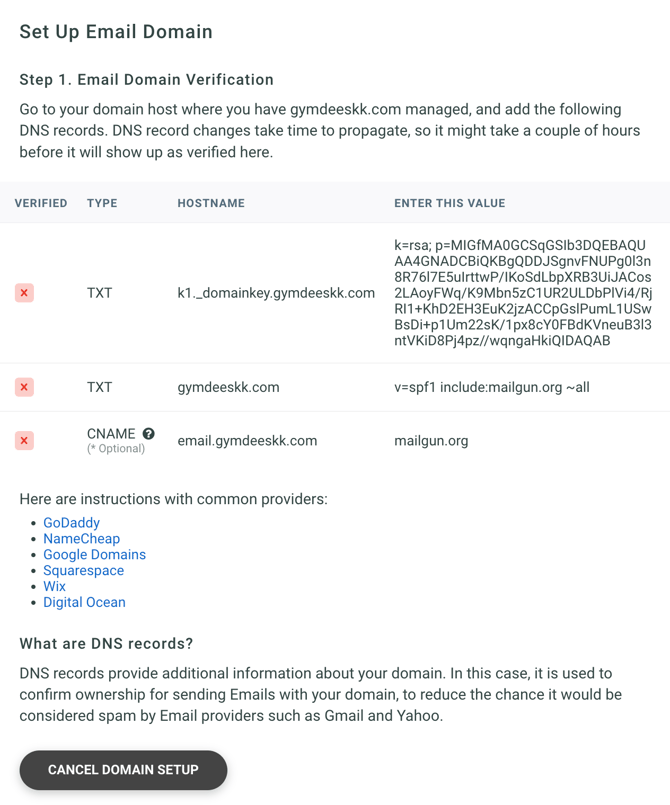
### **Custom Email Domains (MX Records)**
If you have a custom domain that you've connected to Gymdesk for your website ([instructions here](https://docs.gymdesk.com/help/custom-domain?hsLang=en)) and you have a custom domain for your email, such as a business domain through Google/Gmail, you'll also want to make sure you update the MX record type within your domain provider to ensure you don't have any issues with email deliverability.
First, you'll access the MX records within the email provider. For example with Google, these can be found in the Google Admin console under your domain settings. Here are articles for GoDaddy ([adding](https://www.godaddy.com/help/add-an-mx-record-19234) and [editing](https://www.godaddy.com/help/edit-an-mx-record-19235)) & [Google](https://support.google.com/a/answer/16004259?hl=en) on MX records.
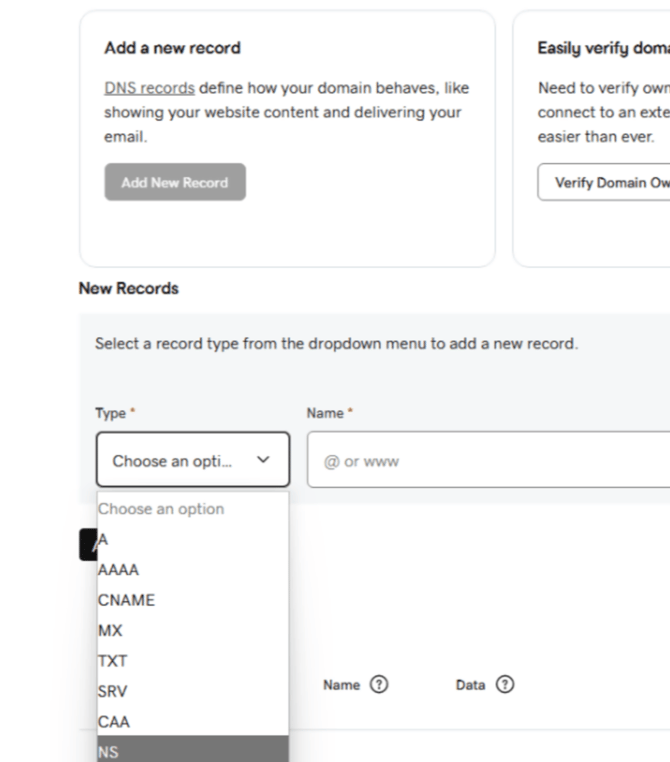
Next, you'll add a record type within your domain provider, similar to how you added an A & CNAME record. This record type will be an MX record. Here's an example of a drop down in GoDaddy, where you can see an MX record type to select and add the records from Google or your email provider.
You may also find this timestamped (start at 1 minute 27 seconds) video below from YouTube on how to adjust your MEX records in Google to be helpful.
- [Gymdesk Glossary](https://docs.gymdesk.com/en/help/docs/gymdesk-glossary?hsLang=en)
- [Getting started](https://docs.gymdesk.com/en/help/docs/getting-started?hsLang=en#main-content)
- [General Overview](https://docs.gymdesk.com/en/help/docs/getting-started?hsLang=en#general-overview)
- [Data & Payments Migration](https://docs.gymdesk.com/en/help/docs/getting-started?hsLang=en#data-payments-migration)
- [Account](https://docs.gymdesk.com/en/help/docs/account?hsLang=en)
- [Gym](https://docs.gymdesk.com/en/help/docs/gym?hsLang=en#main-content)
- [Schedule & Booking Management](https://docs.gymdesk.com/en/help/docs/gym?hsLang=en#schedule-booking-management)
- [Staff Management](https://docs.gymdesk.com/en/help/docs/gym?hsLang=en#staff-management)
- [Ranks & Promotions](https://docs.gymdesk.com/en/help/docs/gym?hsLang=en#ranks-promotions)
- [Members](https://docs.gymdesk.com/en/help/docs/members?hsLang=en#main-content)
- [Membership Structure & Setup](https://docs.gymdesk.com/en/help/docs/members?hsLang=en#membership-structure-setup)
- [Member Payments](https://docs.gymdesk.com/en/help/docs/members?hsLang=en#member-payments)
- [Member Portals & Apps](https://docs.gymdesk.com/en/help/docs/members?hsLang=en#member-portals-apps)
- [Attendance Tracking & Check-Ins](https://docs.gymdesk.com/en/help/docs/members?hsLang=en#attendance-tracking-check-ins)
- [Creating Membership Plans](https://docs.gymdesk.com/en/help/docs/members?hsLang=en#creating-membership-plans)
- [Billing](https://docs.gymdesk.com/en/help/docs/billing?hsLang=en#main-content)
- [Payment Processing](https://docs.gymdesk.com/en/help/docs/billing?hsLang=en#payment-processing)
- [Billing Settings & Discounts](https://docs.gymdesk.com/en/help/docs/billing?hsLang=en#billing-settings-discounts)
- [Accounting](https://docs.gymdesk.com/en/help/docs/billing?hsLang=en#accounting)
- [Marketing](https://docs.gymdesk.com/en/help/docs/marketing?hsLang=en#main-content)
- [Email & Text Messaging](https://docs.gymdesk.com/en/help/docs/marketing?hsLang=en#email-text-messaging)
- [Lead Management & Automations](https://docs.gymdesk.com/en/help/docs/marketing?hsLang=en#lead-management-automations)
- [Gym Websites](https://docs.gymdesk.com/en/help/docs/gym-websites?hsLang=en)
- [Sales](https://docs.gymdesk.com/en/help/docs/sales?hsLang=en)
- [Competition Management](https://docs.gymdesk.com/en/help/docs/competition-management?hsLang=en)
- [Integrations](https://docs.gymdesk.com/en/help/docs/integrations?hsLang=en)
- [Gymdesk Documentation & Policies](https://docs.gymdesk.com/en/help/docs/gymdesk-documentation-policies?hsLang=en)
- [Company](https://gymdesk.com/)
- [About us](https://gymdesk.com/content/about)
- [Contact us](https://gymdesk.com/contact)
- [Resources](https://gymdesk.com/blog/)
- [Features](https://gymdesk.com/)
- [Memberships](https://gymdesk.com/features/members)
- [Billing](https://gymdesk.com/features/billing)
- [Attendance](https://gymdesk.com/features/attendance)
- [Booking](https://gymdesk.com/features/booking)
- [Marketing](https://gymdesk.com/features/marketing)
- [Website](https://gymdesk.com/features/website)
- [Point-of-sale](https://gymdesk.com/features/pos)
- [Reporting](https://gymdesk.com/features/reporting)
- [Facility access](https://gymdesk.com/features/access)
- [Mobile app](https://gymdesk.com/features/member-app)
- [Integrations](https://gymdesk.com/features/integrations)
- [Gym types](https://gymdesk.com/)
- [Martial arts](https://gymdesk.com/software/martial-arts)
- [Membership clubs](https://gymdesk.com/software/membership-clubs)
- [Yoga studios](https://gymdesk.com/software/yoga)
- [Pilates studios](https://gymdesk.com/software/pilates)
- [Fitness gyms](https://gymdesk.com/software/gyms)
- [Gymnastics gyms](https://gymdesk.com/software/gymnastics)
- [Dance studios](https://gymdesk.com/software/dance)
- [Crossfit gyms](https://gymdesk.com/software/crossfit)
- [Resources](https://gymdesk.com/)
- [Our Customers](https://gymdesk.com/customers)
- [Documentation](https://docs.gymdesk.com/help/docs)
- [Pricing](https://gymdesk.com/pricing)
- [Membership contract template](https://gymdesk.com/lp/contract-template)
- [Black belt widget](https://gymdesk.com/lp/bbwidget)
- [Gym software guide](https://gymdesk.com/best-gym-management-software)
- [Trust center](https://gymdesk.com/page/trust)
- [Terms of service](https://gymdesk.com/page/terms)
- [Privacy policy](https://gymdesk.com/page/privacy)
- [Comparison](https://gymdesk.com/)
- [Mindbody](https://gymdesk.com/alternative/mindbody)
- [Jackrabbit](https://gymdesk.com/alternative/jackrabbit)
- [Zenplanner](https://gymdesk.com/alternative/zenplanner)
- [Kicksite](https://gymdesk.com/alternative/kicksite)
- [Spark membership](https://gymdesk.com/alternative/spark)
- [Pushpress](https://gymdesk.com/alternative/pushpress)
- [Gymmaster](https://gymdesk.com/alternative/gymmaster)
- [Glofox](https://gymdesk.com/alternative/glofox)
- [Hapana](https://gymdesk.com/alternative/hapana)
- [Mariana Tek](https://gymdesk.com/alternative/marianatek)
- [Momence](https://gymdesk.com/alternative/momence)
[](https://gymdesk.com/)
Built and run in Austin, TX
Copyright © 2025